 Glyphfield
Brand identity
Edit the shared brand identity that every Studio tool reads, check its brand health score, set it up with a coding agent, and download a brand kit.
Brand identity (tool ID identity) is the Glyphfield Studio tool that edits the BrandIdentity of the active project. A BrandIdentity is the JSON record of one brand: its copy, logos, palette, fonts, graphic device, voice, strategy and image assets. The other Studio tools read it, including Brand elements, Moodboard, Brand book, Animation, Lottie, Design Lab, the expression tools, Color tokens, Typography and Component library. Brand identity also scores the identity, writes a setup prompt for a coding agent and exports a brand kit for code.
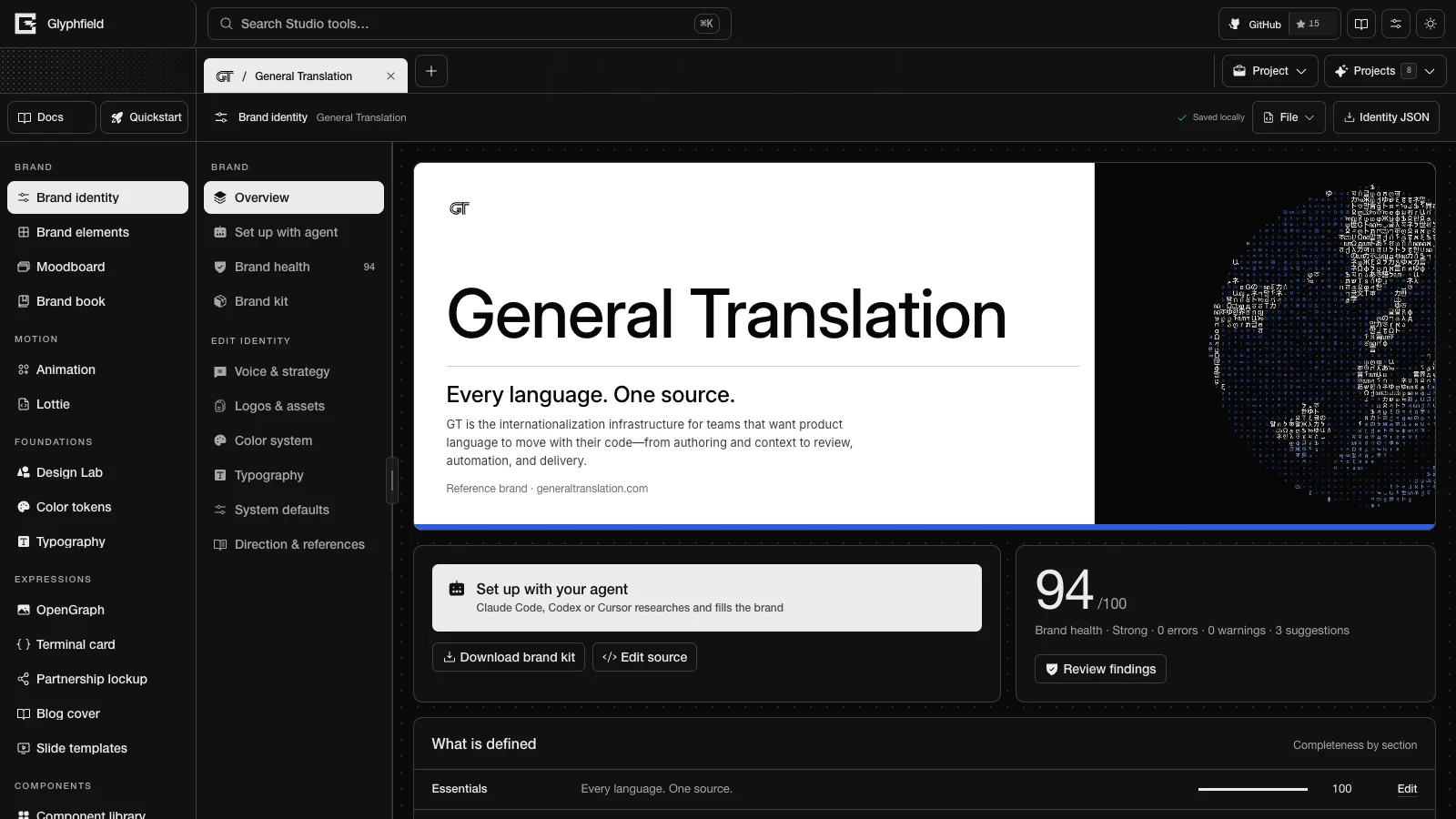
Layout
| Region | Contents |
|---|---|
| Tool header | The save status (Changes pending or Saved locally), File (Advanced → Edit source code) and Identity JSON |
| Left sidebar, Brand group | Overview, Set up with agent, Brand health (with the score) and Brand kit |
| Left sidebar, Edit identity group | Voice & strategy, Logos & assets, Color system, Typography, System defaults and Direction & references |
| Main area | The selected section. Every section except Overview shows the brand mark and the section name at the top. |
Edits stay pending until you save them. While the active project has pending edits, the Studio shows the notice Save these brand changes? with Ignore and Save changes. An agent saves with identity.save. Identity JSON opens the complete identity as <id>-brand-identity.json in the export preview.
Overview
| Panel | Contents |
|---|---|
| Brand cover | The brand name in the Display face, the tagline and the positioning on the dominant field. The cover uses the ink color when ink has a larger share of the palette than paper. For Starter and your own brands the picture is the graphic device drawn live from the palette, so palette and device changes show at once. For a reference brand it is the first match of an asset tagged cover, the asset with ID identity-field, any background or texture asset, or the palette drawn in proportion. A footnote reads "Your brand", "Starter template" or "Reference brand", followed by the website. |
| Starter kit | Starter and your own brands only. Directions applies a whole direction; Palette, Type, Device and Corners change one part. See Starter kit. |
| Quick actions | Set up with your agent, Download brand kit (the ZIP), Edit source and, for an edited built-in identity, Restore the shipped version. Restoring stages the shipped identity as a pending change. Save to keep it. |
| Health summary | The score out of 100, the grade, the counts of errors, warnings and suggestions, and Review findings |
| What is defined | Every audited section with a summary, a completeness meter and Edit |
| System at a glance | The mark on light and dark, the palette in proportion, an "Aa" specimen in the Display face with the family names, and the graphic device drawn live with its name and first two rules |
| Identity essentials | Brand name, Short name (up to 8 characters), Website, Contact email, Social handle, Tagline, Positioning, Mission and Description |
| Identity preview | The identity applied to its own art-directed composition |
Set up with your agent
Set up with agent writes a ready-to-run prompt for a coding agent such as Claude Code, Codex or Cursor. The agent operates the Studio through the Browser API (window.glyphfield.studio, the scripting interface that each Studio tool registers in the page). It researches the brand from its website, repository or design files, fills every section, adds logo and font files, runs the audit, saves the identity and exports the kit.
- Add brand project → Set up with your agent opens a new, empty brand on this panel. The panel explains why a new brand starts with the agent: every tool reads the identity's logo files, colors, contrast pairs, font files, voice and strategy, and the agent copies them from the brand's own sources and notes each source. Fill it in yourself opens Voice & strategy instead.
- New brand and Improve this brand switch the prompt. The Studio selects New brand for a project that is not built in when its tagline, positioning or palette still has the values a new project starts with.
- Copy prompt copies the prompt. It has nine steps: research, brief, connect, validate, apply, files, audit, save and export, and report.
- Resources lists four links, each with a copy button: this project's URL (
/studio?tool=identity&project=<id>), the workflow guide (/docs/agents/brand-setup.md), the identity schema (/api/brand/validate) and the agent skill (skills/glyphfield-brand/SKILL.md). - What your agent can call lists every
identity.*action with its description.
Brand setup with an agent describes the full workflow.
Brand health
Brand health scores the identity from 0 to 100 across eleven weighted sections:
| Section | Weight | Checks |
|---|---|---|
| Essentials | 10 | Name, tagline, positioning, mission, description and website |
| Strategy | 12 | Challenge, central idea, promise, outcome, at least three pillars and at least three personality traits |
| Voice | 10 | At least three principles and three examples, at least two approved phrases and two things to avoid, and a tagline, promise and phrases that do not repeat each other |
| Logos | 14 | Each of the five logo slots, and each logo's surface |
| Color | 14 | The ink, paper and emphasis colors, the contrast of every text pair, the palette proportions, and a palette that differs from the default |
| Typography | 12 | A stored font file for each of the four roles, font licenses, a monospace Code face, unused fonts, the type scale and body line height |
| Graphic device | 8 | The device, its rationale and at least three rules |
| Imagery | 6 | Image direction, at least two non-logo images and alt text |
| Products & proof | 6 | Products, one-line product summaries, audiences, proof, and customer names kept apart from proof |
| Applications | 4 | At least three applications |
| Naming & data | 4 | Distinct color names, the social handle format, the short name and the storage size |
Each check is an error, a warning or a suggestion, worth 3, 2 and 1 points. A section's score is the points of its passing checks divided by the points of all its checks. The overall score is the weighted average of the section scores. The grade is Strong at 90 or more, Good at 75 or more, Needs work at 50 or more, and Incomplete below 50. An identity with any error is graded Needs work at best.
The Contrast pairs panel measures every declared text pair against WCAG 2.2 AA: 4.5:1 for level AA and 3:1 for AA-large. Without declared pairs, the audit checks ink on paper, ink on muted, and ink or paper (whichever contrasts more) on the accent at AA-large. The semantic light and dark roles from Color tokens do not count toward the score.
Findings are grouped under Errors, Warnings and Suggestions. Each finding shows the problem, its detail and its ID, an Agent prompt button that copies a self-contained instruction, and Edit. A finding with a deterministic fix also has a one-click fix button:
| Fix ID | Change |
|---|---|
contrast:<fg>:<bg> | Moves the foreground color's OKLCH lightness until the pair reaches its required ratio. Chroma and hue stay the same. |
proportions | Sets paper to 60, ink to 30, emphasis to 10 and every other color to 0 |
type-scale | Sets a 16 px base and a 1.25 ratio |
body-leading | Sets the Body line height to 1.5 |
alt-text | Uses each asset's label as its missing alt text |
social-handle | Adds @ to the start of the social handle |
short-name | Capitalizes the short name, or sets it in capitals when it has three characters or fewer |
distinct-phrases | Removes approved phrases that repeat the tagline or promise |
prune-fonts | Removes stored fonts that no role uses |
separate-customers | Moves customer names from proof to customers |
logo-surfaces | Sets each logo slot's surface to the surface the slot is for |
font-bindings | Binds each role to a stored font file of its family |
Copy prompt for all findings copies one prompt for every error and warning. It leaves out suggestions.
Brand kit
Brand kit lists each file under Files with a Download button. Preview shows the text files under the tabs brand.md, tokens/tokens.json, tokens/brand.css and tokens/tailwind.css, with Copy.
| File | Download name | Contents |
|---|---|---|
| Brand kit (.zip) | <slug>-brand-kit.zip | A <slug>-brand-kit/ folder with brand.md, tokens/tokens.json, tokens/brand.css, tokens/tailwind.css, identity.json, logos/<id>.<ext> for every logo asset, and fonts/<file> for each font the kit may include |
| brand.md | brand.md | Guidelines for coding agents: the health score, rules, voice, color with the semantic light and dark table, typography with tracking rules, logos, the graphic device, code usage, strategy, products, audiences and proof, applications, a pre-ship checklist and sources |
| Design tokens (JSON) | <slug>-tokens.json | W3C Design Tokens (DTCG 2025.10): color, palette scales, semantic light and dark aliases, font, size, typography, radius and motion |
| CSS variables | <slug>-brand.css | CSS custom properties: --brand-color-* and its scale steps, the semantic --brand-<role> with dark values for prefers-color-scheme, data-theme="dark" and .dark, --brand-font-*, --brand-text-*, --brand-radius, --brand-duration-* and --brand-ease-* |
| Tailwind v4 theme | <slug>-tailwind.css | A Tailwind CSS v4 @theme block plus @theme inline semantic roles, for classes such as bg-paper, text-ink, font-display, bg-background and text-foreground |
| Logo pack (.zip) | <slug>-logos.zip | Every logo asset, named by asset ID |
<slug> is the brand name in lowercase with hyphens. Both ZIP files are stored without compression. The kit includes a font file only when a type role uses it and the file was uploaded or its recorded license names OFL, Apache, MIT, CC0 or the Ubuntu Font License. Every other font that a role uses keeps its @font-face rule, preceded by a comment that asks you to add a licensed copy at the fonts/ path.
Editors
Voice & strategy
| Panel | Fields |
|---|---|
| Strategy | Challenge, Central concept, Brand promise, Desired outcome, strategic pillars and personality traits |
| Voice | Voice principles, approved phrases, language to avoid and greetings |
| Voice examples | For each example, the context, the line to write and the line to avoid. Add example adds one. |
| Audience, products and proof | Audiences, brand values, products, product one-liners in the form Name: what it does, proof statements, and customers (up to 48, kept apart from proof). A one-liner without a colon is ignored. |
| Template samples | Sample person, Role, Event name, Event location, Event date, Event time, Install command, Code sample title, Code sample, product actions, and a latest update (a title, then one change per line) |
List fields take one entry per line. Sources below the panels records where the facts came from. Published plans (up to four) and a sample metric are edited in source. Brand elements, moodboards, the brand book and the expression tools print these fields as content.
Logos & assets
The Logo family panel has five slots. Upload or replace a file in each slot. Tools pick the variant that suits each surface and fall back to another mark when one is missing.
| Slot ID | Use | Required |
|---|---|---|
mark-dark | Mark for light surfaces | Yes |
mark-light | Mark for dark surfaces | Yes |
wordmark | Wordmark for light surfaces | No |
wordmark-light | Wordmark for dark surfaces | No |
mark-mono | One-color mark | No |
The Asset library stores images with a type (logo, background, texture, image, icon, product, proof, motion or reference), a label, usage, alt text, tags, the source owner, the source URL, a license and a redistribution status (Bundled, Original, Research only or URL only). Choose the type in Asset type, then select Add asset. An image can be PNG, JPG, GIF, WebP, BMP, AVIF or SVG up to 4 MB. Glyphfield reads the format from the file bytes. Assets of type proof are stored in proofAssets. The Conversion library sanitizes SVG files and converts PNG, JPG, WebP, GIF, AVIF and BMP files into transparent PNG working copies that Design Lab shaders can use.
Color system
Each palette color has a name, a usage, a HEX value and a share of the layout. Tools read the color IDs ink (text), paper (background), muted (quiet surface) and emphasis (accent). These four cannot be removed. The IDs success, warning, progress and error are optional. Text pairs declares the foreground and background pairs the brand uses for text, each at AA text or AA large, with the measured ratio and a pass or fail mark. Palette presets replaces the eight role colors with a starter kit palette. Colors you added stay, and declared text pairs switch to the pairs the palette is tested for. Tint scales and the semantic light and dark roles are edited in Color tokens.
Typography
Font files stores TTF, OTF, WOFF or WOFF2 files with the identity. Upload font file accepts files up to 2.5 MB, and each stored file has a license field. The last font file cannot be removed. Typography roles assigns a font to the Display, Body, Accent and Code roles, each with Usage, Weight, Line height (0.7–2) and Tracking (−8 to 12 px). Weight runs from the font's lowest weight to its highest, capped at 550, in steps of 50. Type pairings sets all four roles to a starter kit pairing and stores its font files; usage notes and uploaded fonts stay. Type scale sets Base size (12–24 px) and Scale ratio, one of six ratios from 1.2 to 1.618. The scale step each role uses (typeScale.roleSteps) is set in Typography.
System defaults
| Panel | Fields |
|---|---|
| Visual defaults | Interface density (Compact, Comfortable, Spacious), Image treatment (Natural, Monochrome, Duotone), Construction field (None, Dots, Lines), Corner radius (0–32 px) and Default logo scale (40–160%) |
| Graphic system | Recognizable device, Device drawing (a live thumbnail of each starter kit device in the brand's palette, plus a reference brand's own device while it is in use), Device rationale, Composition behavior, Image direction and system rules |
Direction & references
The section opens with an editorial header of the tagline, the premise and the personality. System diagram draws how the brand turns inputs into outcomes. Brand dossier holds the art direction: Brand premise, Personality, Logo system, Typography direction, Color direction, Image selection and treatment, Layout and composition, Graphic device, Motion principles, Provenance and licensing, application recipes, a rendering recipe and do-not rules. Applications lists the places the identity must work, each with a name, category, format and intent. Reference contact sheet records each research reference with its source URL, owner and status (Planned, Captured or Reviewed). A reference stays research-only until its redistribution status permits bundling.
Starter kit
The starter kit holds tested parts that any brand can combine. Applying a part changes the visual system and keeps the brand's name and copy. Generated placeholder marks are redrawn in the new ink, paper and accent.
| Part | Options |
|---|---|
| Palettes | Eight eight-role palettes. Light first: Signal (signal blue on white), Harbor (navy and coral), Ember (ember on cream), Clay (terracotta on sand) and Mono (black and white with one red). Dark first: Forest (deep forest and mint), Ultraviolet (ultraviolet and mint) and Citrus (ink and citrus). Each palette's text pairs pass WCAG AA, or AA large for labels on the accent. |
| Type pairings | Swiss (Switzer, Instrument Serif accent, Geist Mono), Neutral (Inter and Geist Mono), Editorial (Instrument Serif display, Inter text) and Technical (Geist Mono display, Inter text), all from bundled fonts |
| Devices | Signal window, Construction grid, Orbit, Gradient band, Light beam, Current, Dither wall, Light arch and Network horizon. Each comes with its device copy and rules. |
| Corners | Square (0 px), Soft (6 px), Round (12 px) and Pill (20 px) |
| Directions | Signal, Harbor, Ember, Forest, Ultraviolet and Citrus, each a palette, a pairing, a device, corners and a density |
Choosing a device replaces the device name, rationale, composition and rules only while they are still placeholder or starter kit copy; a brand's own device copy stays. A new brand starts from the Harbor direction with placeholder copy. Starter uses the Signal direction.
Built-in identities
Glyphfield ships nine built-in identities. Starter (kind template) is the identity that identity.project.create copies when from is omitted. Its artwork and copy are original Glyphfield work under the MIT license, and its fonts keep their own licenses. The other eight (kind example) are reference studies of real brands. Their marks, media and webfonts remain their owners' property and are not covered by Glyphfield's MIT license. Licensing lists the terms.
| ID | Name | Kind | Graphic device |
|---|---|---|---|
starter | Starter | template | Signal window |
basement | Basement | example | The engineered interruption |
gt | General Translation | example | The glyph globe |
ramp | Ramp | example | The savings ledger |
mintlify | Mintlify | example | The knowledge beam |
tailwind | Tailwind CSS | example | The utility wave |
viteplus | Vite+ | example | The convergence field |
cloudflare | Cloudflare | example | The network horizon |
stripe | Stripe | example | The programmable field |
The General Translation (GT) identity is built from GT's brand canon. Its color direction names four absolute colors (ink #070707, raised ink #101010, titanium #8A8F98 and paper #FFFFFF) and one accent. The accent is signal blue #2F5CE0, lifted to #86A8FF on ink and used on one element per composition. The stored palette holds Ink, Paper, Mist #F4F4F4, Signal blue and four neutral status colors (Cloud, Titanium, Graphite and Charcoal). The graphic device is the glyph globe: the earth drawn in characters from twenty writing systems. The cover asset is the glyph globe on ink.
GT sets Display, Body and Accent in Rasmus Inter and Code in Geist Mono. Rasmus Inter is Rasmus Andersson's Inter Variable 4.1 (font version 4.001) with its optical-size and weight axes, bundled as public/fonts/inter-variable.ttf. Both faces are licensed under the SIL Open Font License 1.1. The picture library holds nine pieces of GT artwork (the glyph globes, the globe and mark, the glyph and horizon fields, the speed marks, the How GT works still and the signal gem smoke). It also holds ten artifact pictures, such as the Rosetta Stone and the Blue Marble, printed through an 8 × 8 Bayer dither. Each picture records its credit and license. GT's marks and artwork are © General Translation, Inc., included with permission for this identity only. Seven artifact pictures are public domain, and the Rosetta Stone, Devanagari manuscript and Louisbourg lighthouse screens are CC BY-SA 4.0 adaptations. THIRD_PARTY_NOTICES.md and public/brands/ASSET-NOTICE.md in the repository list every credit.
Each built-in identity records a fingerprint of the version it shipped with (presetFingerprint). When a Glyphfield release ships a newer version, an untouched built-in identity is replaced by it. An edited built-in identity keeps every edit and gains the fields and assets it did not have. It also drops links to bundled files that a release removed. Files you uploaded stay. Restore the shipped version replaces the edits with the current shipped identity.
Source format
File → Edit source code shows the complete BrandIdentity. Apply code validates it against the BrandIdentity JSON Schema and replaces the identity. GET /api/brand/validate serves that schema. The fields id, kind, revision, builtIn and presetFingerprint keep their project values. Unknown fields are kept. An error names every invalid path, for example colors[1].hex must be a six-digit HEX color such as "#1A2B3C"; received "#FFF".
The top-level fields are applications, artDirection, assets, audiences, colorPairings, colorSystem, colors, contactEmail, customers, description, dossier, fonts, greetings, graphicSystem, mission, motion, name, positioning, productDetails, products, proof, proofAssets, references, samples, shortName, socialHandle, sourceNotes, strategy, style, tagline, typeScale, typography, values, voice and website, plus the project fields above. Asset and font paths must be data: URLs or root-relative paths on the Glyphfield origin. Identity fields describes each field.
Browser API
An export artifact is an object with a non-empty blob and a fileName. studio.download(artifact) saves it.
| Action | Input | Output |
|---|---|---|
identity.read | None | A copy of the BrandIdentity object |
identity.validate | { identity, mode?: 'patch' | 'full' } (default patch) | { ok, issues: [{ code, message, path, severity }] } |
identity.apply | { identity, mode?: 'merge' | 'replace', replace?, remove?, save? } | { identity, warnings, saved, health: { score, grade, counts } }. Throws a TypeError that lists every issue. |
identity.asset.add | { file: File, slot?, id?, type?, label?, surface?, usage?, alt?, license?, sourceUrl?, sourceOwner?, redistribution?, tags?, save? } | { asset } |
identity.font.add | { file: File, roles?, family?, label?, weight?, weightMin?, weightMax?, style?, license?, sourceUrl?, id?, save? } | { font } |
identity.audit | None | The brand health report |
identity.fix | { fixId, save? } | The report after the fix |
identity.save | None | { saved: true } |
identity.export.json | None | An export artifact with the identity JSON |
identity.export.kit | { format?: 'zip' | 'dtcg' | 'css' | 'tailwind' | 'markdown' | 'logos', download? } | An export artifact |
identity.setup.prompt | { mode?: 'new' | 'improve' } | { mode, prompt } |
identity.project.create | { from?: 'starter' | 'scratch' | <built-in or project id>, name? } | { id, name, kind: 'custom', from, url } |
A logo slot replaces that slot in place. identity.font.add treats a file whose name contains "variable" or "[wght" as a 100–900 weight range. After identity.project.create resolves, read window.glyphfield.studio again, because the new project owns the API. Brand setup with an agent describes the merge rules, replace and remove.
HTTP
| Route | Use |
|---|---|
GET /api/brand/validate | The BrandIdentity JSON Schema, the merge-patch schema, the merge rules and the logo slots |
POST /api/brand/validate | { identity, mode?: 'full' | 'patch' } (default full). Returns { ok, issues, identity, health, schemaVersion }. |
GET /api/brand/kit, POST /api/brand/kit | The kit contract. { identity, format: 'dtcg' | 'css' | 'tailwind' | 'markdown' } returns that file. |
GET /api/identities | The nine built-in identities |
These routes store nothing. The ZIP files and font files come only from identity.export.kit in the browser. See Endpoint reference.
Limits
| Item | Limit |
|---|---|
| Image asset | 4 MB; PNG, JPG, GIF, WebP, BMP, AVIF or SVG |
| Font file | 2,500,000 bytes; TTF, OTF, WOFF or WOFF2 |
| Short name | 8 characters |
| Customers | 48 |
| Published plans | 4 |
| Storage | The audit warns when the identity JSON exceeds 3.5 million characters |
| HTTP request body | 5,250,000 bytes |
| Font weight | Studio tools display weights up to 550. The schema accepts 100–900. |
Studio overview
Find every Studio tool by name and ID, manage projects and tabs, search tools, change the visual settings, and learn where the Studio saves your work.
Brand elements
Apply the brand identity to 89 templates for email, product, developer, social, editorial, event and print use, and export PNG, HTML email or JSON.