 Glyphfield
Lottie
Import Lottie JSON or .lottie files, then edit, recolor, and trim them over a transparent, solid, or live background and export frames, GIF, MP4, or source.
Lottie (tool ID lottie) plays and edits vector animations. It accepts Lottie JSON and .lottie bundles and plays them in the browser with @lottiefiles/dotlottie-web. Each frame is composited over a transparent canvas, a solid color, or a live material from the Shader Library.
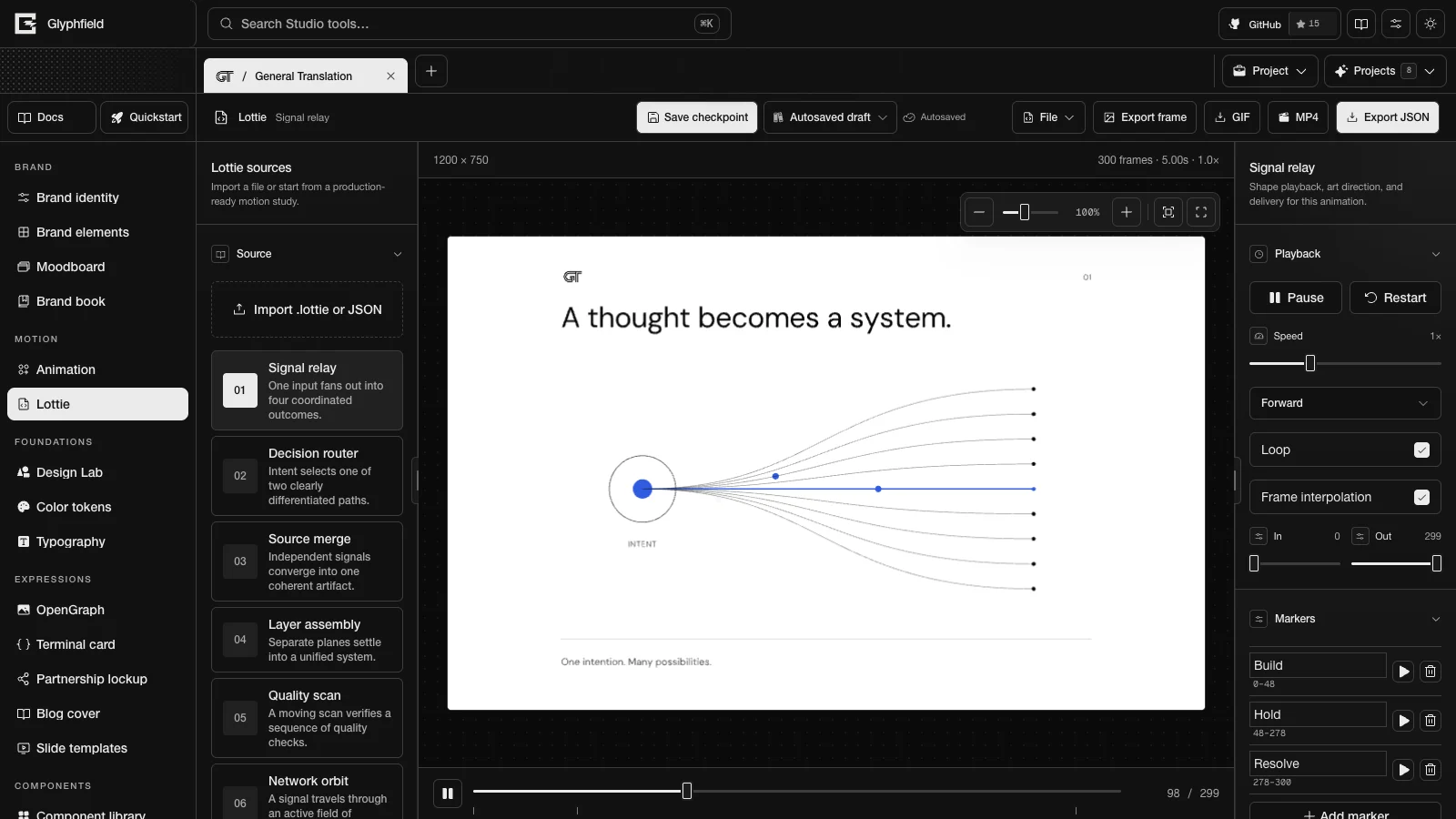
Layout
| Region | Contents |
|---|---|
| Tool header | Save checkpoint, Saved designs, the save status, File (Edit source code, and Reset Lottie editor under Workspace), Export frame, GIF (Export Lottie GIF), MP4 (Export Lottie MP4), and Export JSON or Export .lottie |
| Left sidebar | Lottie sources: Import .lottie or JSON, the seven built-in studies, and Browse LottieFiles |
| Canvas | The animation in the shared canvas viewport, with Pause animation or Play animation, the Animation frame slider with marker ticks, the canvas size, and the frame count, duration, and speed |
| Right inspector | 02 Playback, 03 Markers, 04 Layers, 05 Appearance, and 06 Live material when the background is a live material |
Built-in studies
Seven studies ship with Glyphfield. Each is 960 × 720 at 60 FPS and 300 frames (five seconds), with the markers Build (frames 0–48), Hold (48–278), and Resolve (278–300).
| Study | ID |
|---|---|
| Signal relay | signal-relay |
| Decision router | decision-router |
| Source merge | source-merge |
| Layer assembly | layer-assembly |
| Quality scan | quality-scan |
| Network orbit | network-orbit |
| Endpoint delivery | endpoint-delivery |
A first visit starts from the identity's colors: its paper field, ink artwork, a quiet secondary, and its accent. Choosing a study loads its current design. Saved compositions keep their source until you choose a study again.
Import
| Input | Editable | Downloaded as |
|---|---|---|
| Lottie JSON | Layers, text, colors, markers, and appearance | Edited JSON |
.lottie bundle | Playback, trim, canvas size, fit, and background | The original archive |
Import accepts .lottie, .json, application/json, and application/zip+dotlottie. A file is treated as a .lottie archive only when its name ends in .lottie. JSON must contain a numeric fr and a layers array. Glyphfield sets no file size limit. The browser player decides which Lottie features render. An unsupported file shows "Choose a .lottie file or Lottie JSON document.", and invalid data shows "The selected file is not valid Lottie data."
Playback
| Control | Values |
|---|---|
| Play or Pause, Restart | Transport |
| Speed | 0.1×–3× |
| Playback direction | Forward, Reverse, Bounce, Reverse bounce |
| Loop, Frame interpolation | Toggles |
| In, Out | Trim the segment |
| Animation frame | Seeks within the In to Out segment and pauses playback |
With reduced motion on, playback starts paused at the middle of the segment.
Markers
Markers name segments of the timeline. Play marker <name> sets the in and out frames to that segment and plays it. Add marker creates "Segment N" from the current frame to the out point. Each marker has a name field (up to 64 characters) and Remove marker <name>. An animation keeps at most 64 markers. Add marker is unavailable at 64, and editing the markers of an imported file with more keeps its first 64. JSON markers are written into the exported document's markers. Markers in a .lottie bundle are read from the bundle and play the same way.
Layers and text
Layers lists the document's top-level layers with their type. Hide layer <name> removes a layer from playback and every export without deleting it, and Show layer <name> restores it. Layers hidden in the source cannot be shown. Text layers have Text for layer <name> (up to 500 characters) and Restore original text for <name>. These edits apply to JSON documents only. They are non-destructive: the source is kept, and the preview, frame PNG, GIF, MP4, and JSON export carry the edited result. Each layer's key is its ind, or #<position> when it has none.
Appearance
| Control | Values |
|---|---|
| Canvas size | Landscape 1200 × 750, Portrait 750 × 1200, Square 960 × 960 |
| Animation fit | Contain, Cover, Fill, Fit width, Fit height |
| Transparent background | Toggle |
| Canvas background type | Solid color or Live material |
| Canvas background | Color |
| Palette buttons | Studio (warm paper, ink, and terracotta, with its background), Mono (light artwork on #161816), Brand (the identity's ink, emphasis, and paper colors for the artwork only) |
| Primary, Secondary, Accent artwork color | Color, with Use <token> for <slot> buttons for each identity color |
| Corner radius | 0–48 px |
| Stroke width | 1–16 px |
| Palette recolours every paint | The primary slot recolors every unnamed paint, which is how older projects behaved |
| Show brand logo | Adds the identity's mark, tinted with the Primary color, as a "Brand logo" layer in the top-left corner. On for the built-in studies and off for imported files |
For a .lottie bundle, Appearance shows only the canvas size and fit. Show brand logo appears only for JSON documents and only when the identity has a logo.
Corner radius and Stroke width appear while Palette recolours every paint is on. They then apply to every static rectangle radius and every static stroke width in a JSON document. A radius is limited to half the rectangle's shorter side. In the built-in studies, strokes named with weight=N keep their relative weights. In other documents every static stroke takes the Stroke width value. With the switch off, imported JSON keeps its authored radii and stroke widths.
The built-in studies recolor through the three palette slots. When Palette recolours every paint is off, imported JSON keeps its authored colors and Document colours lists the 16 most used static fill, stroke, gradient stop, and text colors. Replace a color with the picker or a brand token. Brand tokens maps every document color at once, and Authored restores the originals. Brand mapping sends colors with an OKLCH chroma of at least 0.06 to the brand's accents in order of chroma, and sends neutrals to the brand neutral nearest in lightness.
Live material appears when the background type is Live material and the canvas is not transparent. It has Quick look, Material, Color system, Form, Light and texture, Orientation, Center, and Motion. During export, material time follows the output clock.
Export
| Action | Result |
|---|---|
| Export frame | A PNG of the current frame and background at the canvas size, named <id>-frame-<n>.png |
| GIF | The trimmed segment at 25 FPS with a 256-color global palette that protects the three artwork colors, named <id>.gif |
| MP4 | The trimmed segment at 30 FPS, named <id>.mp4 |
| Export JSON or Export .lottie | The edited JSON, which keeps the source file name, or the original .lottie archive |
GIF and MP4 follow the speed and direction. Bounce modes play forward and back, so they last twice as long. GIF and MP4 have no alpha channel, so a transparent canvas is flattened onto the canvas color. Only one GIF or MP4 export runs at a time. Export needs WebGL. The GIF and MP4 player stops after 10 seconds if the animation does not load, and the frame PNG player stops after 8 seconds.
The JSON export includes the palette-slot colors, the corner radius, the stroke width, the brand font, and the layer, text, color, and marker edits. When Show brand logo is on, it also includes a "Brand logo" layer. The brand font replaces the font families listed in the document's fonts.list.
Source format
File → Edit source code shows a CanvasDocument schema 2. metadata.studio is { sourceVersion: 1, toolId: "lottie", state }, where state holds appearance (including recolor and brandLogo), background (color, materialId, materialSettings, style, transparent), canvasPreset, edits (colorMap, hiddenLayers, markers, textOverrides), playback (fit, interpolate, loop, mode, segmentStart, segmentEnd, speed), and source with the raw animation in source.data. A .lottie archive is stored as an asset of the lottie-animation element.
Raw Lottie JSON can also be pasted into the drawer. Applying it replaces the animation, clears all edits, sets recolor to source, and sets brandLogo to false. A saved document without brandLogo shows the logo for a Glyphfield study and hides it for an import.
Browser API
The Browser API (window.glyphfield.studio) has these Lottie actions:
| Action | Input | Output |
|---|---|---|
lottie.describe | None | { format, source, totalFrames, frameRate, segment, layers, textLayers, colors, markers, edits, recolor, brandLogo } |
lottie.edit | { hiddenLayers?, colorMap?, textOverrides?, markers?: [{ name, frame, duration }], recolor?: 'palette' | 'source', brandLogo?: boolean }. Each listed field replaces the stored one | The lottie.describe result |
lottie.colors.brand | None | The lottie.describe result |
lottie.segment.set | { marker } or { start, end } | The lottie.describe result |
lottie.export | { format: 'png' | 'source' | 'gif' | 'mp4', download? } | An export artifact |
lottie.export.frame.png, .gif, .mp4, .source | None | An export artifact |
lottie.edit and lottie.colors.brand work on JSON documents and reject .lottie archives. lottie.edit rejects unknown layer keys, malformed colors, and malformed markers. Color and marker errors name the field path. lottie.segment.set with a marker name fails when the document has no marker of that name. To get the edited JSON, call lottie.export.source. readSource() returns the CanvasDocument envelope.
const studio = window.glyphfield.studio;
const file = new File([lottieJson], 'animation.json', { type: 'application/json' });
studio.set('Import .lottie or JSON', file);
// Wait for the import, then:
const lottie = await studio.invoke('lottie.describe');
const title = lottie.textLayers[0];
await studio.invoke('lottie.edit', {
  hiddenLayers: [lottie.layers.at(-1).key],
  textOverrides: { [title.key]: 'Edge by default.' },
  recolor: 'source',
});
await studio.invoke('lottie.colors.brand');
const [marker] = lottie.markers;
if (marker) await studio.invoke('lottie.segment.set', { marker: marker.name });
const gif = await studio.invoke('lottie.export.gif');
HTTP
Lottie has no HTTP generation route.
Limits
- Markers: 64 per document through the Browser API and saved sources. Marker names: 64 characters. Text overrides: 500 characters.
- Layer, text, and color edits need a JSON document.
- Export needs WebGL, and MP4 also needs a browser video encoder.
- Browse LottieFiles opens the LottieFiles site. Glyphfield does not mirror that library, so check each animation's license before use.
Animation
Sequence text, logo, and image scenes with keyframes, text entrances, and transitions, add audio, and export GIF, MP4, a PNG poster, or a project file.
Design Lab
Compose layered brand graphics from text, marks, images, and live shaders on an open canvas with artboards, then export images, video, or a project file.