 Glyphfield
Moodboard
Compose the brand identity as an editable board of tiles in five compositions, edit each tile's layout and copy, and export it as PNG, SVG or JSON.
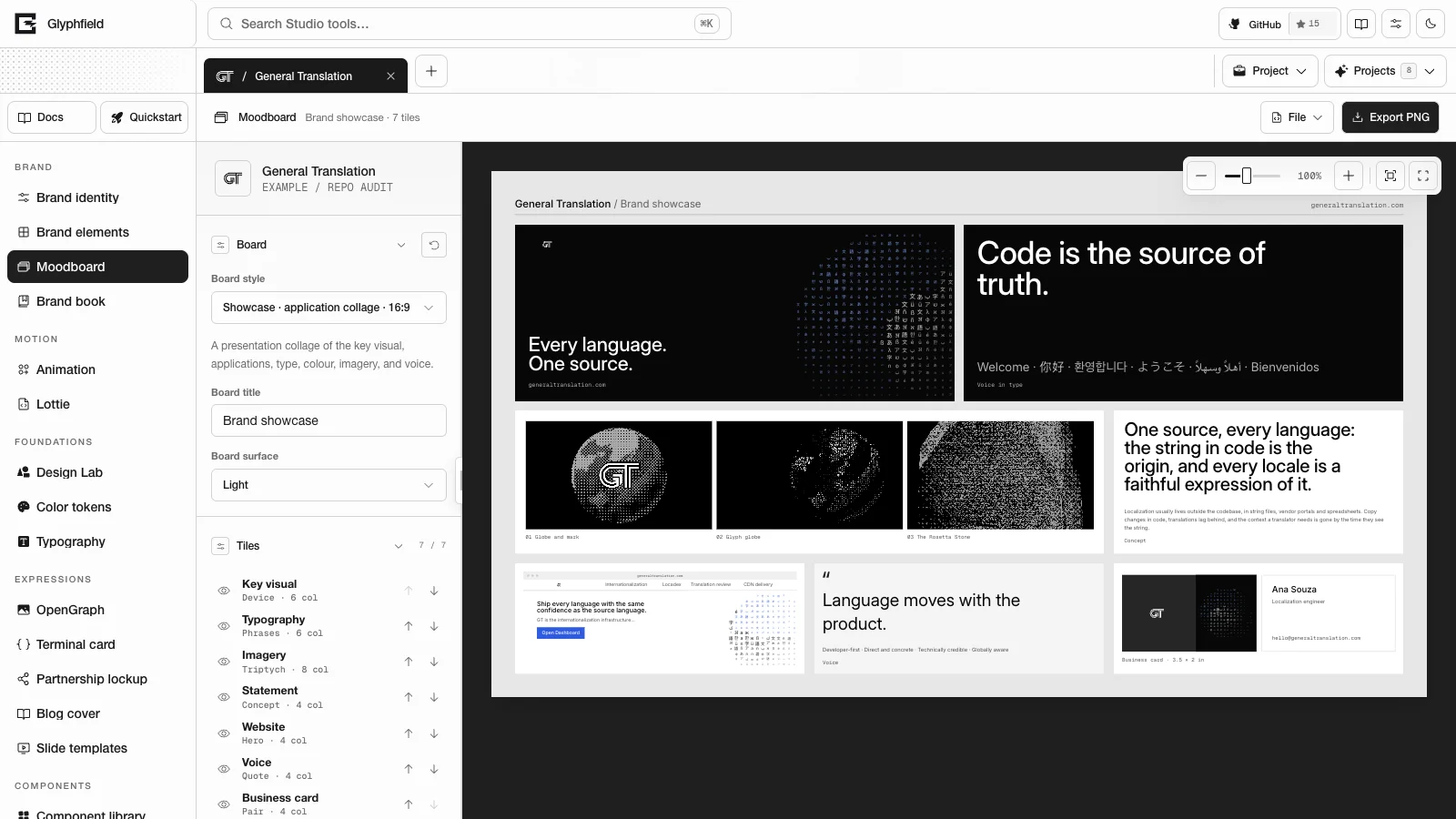
Moodboard (tool ID design-board) is the Glyphfield Studio tool that composes the active brand identity as a presentation board of tiles on a 12-column grid. Every tile is built from the identity: its graphic device, logos, type, palette, voice, products, proof and library images. You can reorder, hide, resize, recolor and rewrite tiles.
Compositions
Board style selects one of five boards. Each board keeps its own tile edits.
| Board | ID | Ratio | Layout size | Default tiles |
|---|---|---|---|---|
| Showcase | showcase | 16:9 | 1600 × 900 | Key visual, poster, type, color, imagery, social post, voice and business card |
| Campaign | campaign | 16:9 | 1600 × 900 | Key visual, billboard, poster, social post, email, event badge, website and proof |
| System | system | 4:5 | 1600 × 2000 | Logo, statement, type scale, color proportion, device construction, imagery, voice, motion, proof, business card and website |
| Specimen | specimen | 4:5 | 1600 × 2000 | Display face, type pairing, type scale, character set, phrases, color proportion, contrast pairs and tints |
| Catalog | catalog | 2:3 | 1600 × 2400 | Twelve tiles (key visual, logo, type, color, device, imagery, voice, proof, poster, social post, business card and motion), then every eligible source image in 6 columns and every identity application in 3 columns |
Showcase and Campaign follow the identity's art direction (artDirection.moodboard), so their tile mix and proportions differ between identities.
Layout
| Region | Contents |
|---|---|
| Tool header | File (Export SVG, Download identity JSON and Advanced → Edit source code) and Export PNG |
| Left sidebar | The identity name and mark, Board (Reset board, Board style, Board title and Board surface), Tiles, the selected tile's settings, Export, Generated applications, and Central idea and sources |
| Canvas | The board in the shared canvas viewport. Each tile is a button labeled Select <tile> tile. |
Board surface is Light or Dark. Generated applications lists the identity's applications, and Central idea and sources shows the central concept, the graphic device and the source notes.
Tiles
Select a tile on the board or in the Tiles list. Drag a tile onto another tile on the board to reorder. Escape clears the selection. The list shows each tile's name, layout and width, with these accessible controls:
Hide <tile> tile <id>orShow <tile> tile <id>toggles the tile. The remaining tiles reflow.Select <tile> tile <id> in listselects it.Move <tile> tile <id> earlierandMove <tile> tile <id> laterreorder it.
The selected tile's settings have Reset tile and these fields:
| Field | Values |
|---|---|
| Layout | The tile kind's layouts (see the table below) |
| Size | Quarter (3 columns), Third (4), Half (6), Two thirds (8) or Full width (12). Rows are justified to the full width. |
| Surface | Paper, Muted, Ink, Deep or Accent. The text color follows for contrast. |
| Image | Graphic device or a library image. Shown for image tiles only. |
| Headline, Body and Caption | Up to 600 characters each |
With a tile selected, click its text on the board to edit it in place. The accessible labels are Edit <tile> headline, Edit <tile> body and Edit <tile> caption.
| Tile | Kind ID | Layouts (source IDs) |
|---|---|---|
| Key visual | cover | device, image, type |
| Poster | poster | device, image, type |
| Billboard | billboard | device, image |
| Graphic device | device | field, construction, crops |
| Logo | logo | pair, single, clearspace |
| Typography | type | glyph, scale, phrases, pairing, charset |
| Colour | palette | proportion, swatches, pairs, tints |
| Imagery | imagery | single, pair, triptych |
| Statement | statement | concept, promise |
| Voice | voice | quote, dodont |
| Proof | proof | figures, list |
| Motion | motion | curve, frames |
| Social post | social | post, story |
email | message, inbox | |
| Website | web | hero, product |
| Event badge | badge | lanyard, card |
| Business card | card | pair, front |
The image tiles are Key visual, Poster, Billboard, Imagery, Social post and Website. Their images come from the identity's curated library images. An identity without curated images uses any of its non-logo images.
Export
| Action | Result |
|---|---|
| Export PNG | Renders the board as PNG at the size chosen in Export and opens it in the export preview |
| File → Export SVG | Opens a standalone SVG of the 1600 px wide layout, with brand fonts and images embedded, in the export preview |
| File → Download identity JSON | Opens the complete active BrandIdentity in the export preview |
Output size offers Standard, Retina (the default), High resolution, Ultra and Custom. A preset sets the PNG width, and the height follows the board ratio. Custom takes Custom width from 800 to 4800 px. The board is vector artwork, so it renders at the chosen size directly.
| Preset | 16:9 boards | 4:5 boards | Catalog |
|---|---|---|---|
| Standard | 1600 × 900 | 1600 × 2000 | 1600 × 2400 |
| Retina | 2400 × 1350 | 2400 × 3000 | 2400 × 3600 |
| High resolution | 3200 × 1800 | 3200 × 4000 | 3200 × 4800 |
| Ultra | 4800 × 2700 | 4800 × 6000 | 4800 × 7200 |
The Export section shows the exact pixel size before export. PNG and SVG both embed every brand font and library image, so the output matches the preview. PNG files are named <brand>-moodboard-<width>x<height>.png.
Source format
File → Edit source code shows glyphfield.moodboard version 2:
{
  "schema": "glyphfield.moodboard",
  "version": 2,
  "composition": "showcase",
  "exportPresetId": "retina",
  "customWidth": 2400,
  "boards": {
    "showcase": {
      "title": "Brand showcase",
      "surface": "light",
      "tiles": [
        { "id": "cover", "kind": "cover", "label": "Key visual", "variants": ["device", "image", "type"], "hidden": false, "variant": "device", "span": 8, "tone": "deep", "assetId": "", "copy": { "headline": "Financial infrastructure for the internet.", "body": "…", "caption": "stripe.com" } }
      ]
    }
  }
}compositionisshowcase,campaign,system,specimenorcatalog. Every key inboardsmust be one of these.exportPresetIdisstandard,retina,high,ultraorcustom.customWidthis clamped to 800–4800.- Tile order follows
tiles. A partial list moves the listed tiles first, and omitted tiles keep their settings. Tile IDs must be unique. variantmust be one of the tile'svariants.spanis 3, 4, 6, 8 or 12.toneispaper,muted,ink,deeporaccent.assetIdis an eligible library image, or empty for the graphic device.titleholds up to 120 characters and each copy field up to 600. Values equal to the identity defaults are not stored, so untouched copy keeps following later identity edits.- A version 1 document (
composition,exportPresetIdandcustomWidthonly) still applies and keeps the current tile edits.
Board source configures presentation only. Content, assets, fonts and art direction come from Brand identity.
Browser API
The Browser API (window.glyphfield.studio) exposes these actions while Moodboard is the active tool. Each returns an export artifact, an object with a non-empty blob and a fileName.
| Action | Input | Output |
|---|---|---|
moodboard.export.png | None | An export artifact with the PNG |
moodboard.export.svg | None | An export artifact with the SVG |
moodboard.export.identity | None | An export artifact with the identity JSON |
Tile controls use the accessible labels above. The Specimen board has several Typography tiles and several Colour tiles, so Select Typography tile matches more than one tile. Use the list labels, which include the tile ID.
Limits
- PNG width up to 4800 px. The long edge reaches 6000 px on 4:5 boards and 7200 px on the Catalog board at Ultra.
- SVG export always uses the 1600 px wide layout.
- Board title 120 characters. Tile copy 600 characters per field.
Brand elements
Apply the brand identity to 89 templates for email, product, developer, social, editorial, event and print use, and export PNG, HTML email or JSON.
Brand book
Turn the brand identity into a 54-page standards book, reorder and hide its sections, edit each page's layout and copy, and print it to PDF.