 Glyphfield
Shader Library
Browse, search, and filter the shared catalog of live materials, check each engine and its license, and tune the settings that Studio tools save.
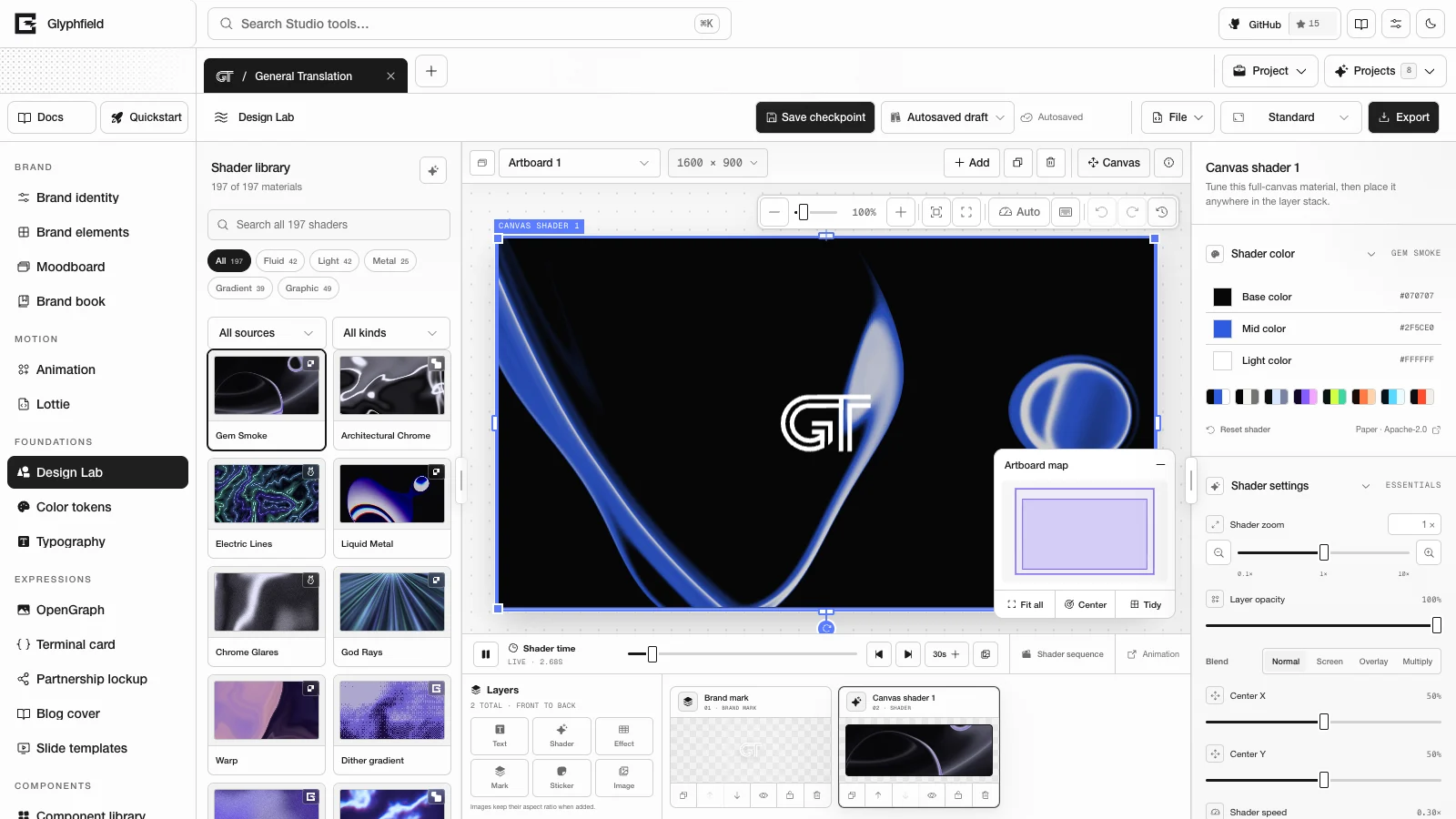
The Shader Library is Glyphfield's shared catalog of live materials (animated shaders). Design Lab (the layered composition tool), Animation, Lottie, and the expression tools take their materials from it. Each tool stores a material by its ID and settings. This release lists 197 materials. GET /api/materials returns the current list, count, engines, controls, and defaults, so agents read the count from the endpoint.
Where it appears
| Tool | Library form | Result of choosing a material |
|---|---|---|
| Design Lab | The full left sidebar | Adds a shader layer, replaces the material of the selected shader layer, or fills the selected text, mark, or image layer |
| Animation | A compact browser for the base background (30 cards at a time), and a Material select for one scene's background | Sets the sequence background, or that scene's background |
| Lottie | A Material select in the Live material section | Sets the canvas background behind the animation |
| OpenGraph, Terminal card, Partnership lockup, Blog cover, Slide templates | A compact browser in the shader layer inspector (12 cards at a time) | Places the material's still thumbnail, with a Tint of Original colors or Brand duotone |
Compact browsers have search, the look buttons, and the source and kind filters. Show more shaders adds another batch of cards.
Browse and filter
The Design Lab library header shows Shader library and the number of materials shown out of the total, for example 197 of 197 materials.
| Control | Behavior |
|---|---|
| Choose a random shader | Picks a material from the filtered list |
| Search shaders | Splits the query into words. Every word must appear in the material's name, description, engine name, look, or kind |
| Look buttons | All, Fluid, Light, Metal, Gradient, Graphic. Each button shows its count for the current source and kind |
| Shader source filter | All sources, or one engine: HoloCloth, Shaders.com studies, Design studies, WebGL Fluid, Glyphfield, Paper, ShaderGradient, Shaders.com WebGPU |
| Shader kind filter | All kinds, Backgrounds (materials that fill an artboard), or Interactive (simulations that respond to the pointer) |
| Cards | A static WebP thumbnail, the source badge, and the name. The selected card is marked |
| Load more shaders | The list starts with 12 cards and adds 24 more each time the button scrolls into view or is clicked |
Search matches substrings, so interactive smoke and metal chrome both work. Shaders.com descriptions end with their upstream category, so Textures and Shape Effects also work as search terms.
Order
The order is fixed:
- Fourteen curated materials: Gem Smoke, Architectural Chrome, Electric Lines, Liquid Metal, Chrome Glares, God Rays, Warp, Dither gradient, Mesh gradient, Spectral Bloom, Radiant Void, Galactic Rings, Fluid Energy, and Holo Cloth.
- The richer materials, highest quality score first. Prismatic sphere and Glyph field sit directly after Water · Abstract.
- Simple patterns and the Paper filters that process a sample picture, highest quality score first. Examples are stripes, grids, spirals, dot grids, the halftones, and image dithering.
Within the second and third groups, two presets of one Paper family do not appear next to each other when another material can go between them.
Materials the library leaves out
- Shape primitives, plain fills, and raw noise. These are the Shaders.com shapes (Circle, Star, Polygon, Heart, and the others), Solid Color, Linear Gradient, Radial Gradient, Diamond Gradient, Thin Film, Studio Background, Image Texture, Text, the Perlin, Simplex, Wavelet, and Gabor noises, and the Paper Perlin Noise, Simplex Noise, and Waves families.
- The Paper Static Mesh and Static Radial families.
- The Shaders.com image effects. They transform the pixels beneath them, so Design Lab runs them on Effect layers.
/api/materialslists them underimageEffects. - The Shaders.com Group, VideoTexture, WebcamTexture, and HTMLInCanvas components. Browsing the library does not request camera access.
A saved document that uses a material the library leaves out still loads and renders it. HTTP design-sequence requests accept only listed materials.
Engines
| Source filter | Engine | License | Requirement | Listed materials |
|---|---|---|---|---|
| Paper | @paper-design/shaders-react 0.0.78 | Apache-2.0 | WebGL2 | 100 presets from the Paper families |
| Shaders.com WebGPU | shaders 4.0.1 | MIT | WebGPU | 70 materials: 40 Textures, 19 Shape Effects, 10 Interactive, and Lens Flare. IDs start with shader-effects- |
| Glyphfield | Original GLSL and Canvas 2D | Glyphfield (MIT) | WebGL2. Glyph field uses Canvas 2D | Glyph field, Dither gradient, Mesh gradient, Grain gradient, Liquid Glass, Caustics, Iridescent Foil, Nebula, Silk Ribbons |
| Shaders.com studies | Original GLSL | Glyphfield (MIT) | WebGL2 | Pixel Beams, Soft Register, Spectral Bloom, Pistons, Architectural Chrome, Chroma Flow, Drift, Mosaic, Circuit. IDs start with shaders- |
| Design studies | Original GLSL | Glyphfield (MIT) | WebGL2 | Electric Lines, Chrome Glares, Relief Gradient, Orbit Gradient, Radiant Void, Galactic Rings |
| HoloCloth | Original GLSL adapted from HoloCloth | MIT | WebGL2 | Holo Cloth |
| WebGL Fluid | A stable-fluids solver adapted from Pavel Dobryakov's WebGL Fluid Simulation | MIT | WebGL2 with half-float render targets | Fluid Energy |
| ShaderGradient | @shadergradient/react 2.4.20 | MIT | WebGL2 | Prismatic sphere |
The Shaders.com studies are original implementations of public Shaders.com techniques. The design studies are original implementations informed by the visual directions of Evil Rabbit Shaders, GRADIENTOOL, and Grainient.
Glyphfield's original materials are 24 GLSL programs: the eight Glyphfield GLSL materials, the nine Shaders.com studies, the six design studies, and Holo Cloth. They blend palette colors in linear light, interpolate color ramps in OKLab, dither every frame before 8-bit output, and size patterns relative to the frame. A preview and a 4K export therefore show the same composition.
Fluid Energy solves velocity on a coarse grid. The grid's short side grows with Detail from 96 to 224 cells, scaled by render quality. Each step runs 20 pressure iterations, and the simulation runs 150 steps before the first frame. Three moving emitters and the pointer add dye.
Shaders.com WebGPU behavior
- Each material's code loads when the material is first used. All Shaders.com materials on a page share one GPU device. Rendering is capped at 30 FPS and at a device pixel ratio of 2.
- Stateful materials (the Interactive group, Particles, and Smoke Fill) simulate 3 seconds before they first appear, so they open already developed.
- Interactive materials follow a slow automatic cursor while the real pointer is elsewhere. Moving the pointer over the canvas takes control. The real pointer keeps control for 1.5 seconds after it stops moving.
- Without WebGPU, the material shows its still thumbnail with the message "WebGPU is unavailable here. Showing a still preview." Still and motion exports refuse the material and do not export the thumbnail.
Loading and replacing
Shaders.com and ShaderGradient materials load their engine code on demand. A library card starts that download when the pointer enters it or the card receives focus, so the material paints sooner when it is chosen. Paper and Glyphfield materials ship with the canvas and need no preload.
When a live canvas switches to another material, the previous material stays on screen in a paused state until the new one has drawn its first frame. The old material then fades out over 160 ms. If the new material is not ready after 8 seconds, the old one fades out anyway.
WebGL2 availability
Paper, Glyphfield GLSL, Fluid Energy, and Prismatic sphere need WebGL2. Studio requests the WebGL2 context with failIfMajorPerformanceCaveat, so software rendering counts as unavailable. Without WebGL2, the canvas shows a placeholder named "Shader preview unavailable" and checks again every 2.5 seconds. A lost WebGL context is remounted after 350 ms, up to five times. After a 2.5-second cooldown the cycle can start again. Studio controls, source editing, and exports that do not need WebGL keep working.
Shared controls
Design Lab's shader inspector and the Live material controls map one set of settings onto every engine, and each engine interprets a setting in its own way. The Live material controls appear in Lottie and in an Animation scene's background. The Animation base background has its own shorter set, described on the Animation page.
| Setting | Design Lab inspector | Live material controls |
|---|---|---|
| Colors | Base color, Mid color, Light color | Base color, Mid color, Light color |
| Palettes | The identity palette and 7 presets | The identity palette and 15 presets |
| Quick look | None | 9 presets: Holo cloth, Quiet mesh, Polished chrome, Soft grain, Graphic dither, Spectral focus, Electric fluid, Deep glyph field, Kinetic signal |
| Speed | Shader speed 0–1.5 | Shader speed 0–1.5 |
| Frequency | 0.5–12 | 0.2–10 |
| Strength | Warp 0–1.5 | Strength 0–2 |
| Detail | 0.5–9 | 0.5–8 |
| Grain | Texture 0–100 | Grain 0–100% |
| Brightness | Light 0.35–1.6 | Brightness 0.1–2 |
| Amplitude | 0–10 (under Advanced) | 0–8 |
| Density | 0.1–2 (under Advanced) | 0.1–2 |
| Rotation | Rotation −180° to 180° (Z only, under Advanced) | Rotation X, Rotation Y, Rotation Z 0°–360° |
| Center | Center X and Center Y (Paper materials) | Center X and Center Y (Paper materials) |
| Zoom | Shader zoom 0.1×–10× | None |
The 15 palette presets are Monochrome chrome, Mercury, Ultraviolet, Signal lime, Copper heat, Arctic, Vermilion ink, Cobalt bloom, Signal axis, Signal terraces, Solar orbit, Mineral wave, Paper aperture, Ink dither, and Signal dither. Design Lab shows the first seven. A preset sets Base, Mid, and Light, and the colors stay editable afterward.
/api/materials publishes the API ranges under controls. They match the Live material controls. Speed runs from 0 to 1.5 in every control because motion stops getting faster at 1.5. For Prismatic sphere, speed sets the radius of the sphere's loop path, up to 0.5.
Shaders.com materials use the colors, speed, and zoom, plus their native controls. Strength, detail, frequency, grain, brightness, amplitude, density, and rotation do not apply to them, so Design Lab hides those sliders and the Advanced section for them.
Native Shaders.com controls
Each Shaders.com material shows its upstream settings in Effect settings: colors, gradient stops, lights, positions, numeric ranges, switches, choices, and structured values. A setting that applies to one mode appears only when that mode is chosen.
| Setting type | Behavior |
|---|---|
| Colors | Background and base colors take Base, the main color takes Mid, highlights take Light, and multi-stop gradients take all three. Materials with a built-in color scheme, such as Color Wheel and Ink Flow, start in their custom-color mode. A color changed in Effect settings is saved and replaces the palette color. Reset effect settings returns every setting to its default |
| Speed | The shared Shader speed control sets playback speed, and each effect's own speed multiplier is hidden. Patterns that are still by default upstream, such as Chevron, move at a slow native rate so the speed control can animate them |
| Surface | Shape Effects materials have a Surface choice that starts at Full canvas. Full canvas fits the native surface to the artboard's ratio and removes the upstream demo sphere. Neon, Light Edge and Obsidian render as one rounded panel inset from the artboard edges, so their lit rim stays visible. Shape restores the original geometry and its placement controls |
| Structured values | Gradient stops and lights have their own editors, with up to 8 entries. Other structured values, such as shapes, use a JSON field |
Settings are stored in settings.effectProps, which holds only changed values. /api/materials returns each material's nativeControls with defaults, choices, and ranges. A color control's palette field names the stop that seeds it: base is settings.colorA, main is colorB, highlight is colorC, and ramp or lights spread all three. Controls marked hidden, such as the native speed, are not shown. shaderEffects.components lists all 199 upstream components.
{
  "materialId": "shader-effects-aurora",
  "settings": {
    "speed": 0.3,
    "effectProps": { "intensity": 80, "colorA": "#A533F8", "colorB": "#22EE88" }
  }
}
This is the shader part of a design-sequence request. Aurora's colorA and colorB are set explicitly, and its colorC follows the palette.
Time and motion
Every tool stores shader time, pause state, zoom, colors, and settings in its document. Design Lab adds lossless frame captures and shader sequences, described in Shaders and time. Each /api/materials record has a motion object:
| Field | Meaning |
|---|---|
provider | paper, webgpu, fluid, shadergradient, custom-glsl, or canvas2d |
motionModel | procedural, direct-time, stateful, or static |
supportsPngSnapshot | The material can be captured as a lossless PNG |
supportsEditableSeek | A time value reproduces the frame. It is false for stateful and static materials |
loop.kind | continuous, static, configured (Prismatic sphere), or analytic-candidate (three Paper Dithering presets). No material promises a pixel-exact loop |
Source format
| Tool | Where the material is stored |
|---|---|
| Design Lab | Shader elements, and metadata.designLab.layerShaders for materials on content layers: material ID, settings, opacity, blend mode, zoom, frameState, and frameSnapshot |
| Animation | metadata.animation.sequenceBackground, with per-scene exceptions in backgroundOverrides |
| Lottie | metadata.studio.state.background, with materialId and materialSettings |
| Expression tools | A shader layer whose data.materialId names the material and whose asset is the material's still thumbnail |
HTTP
GET /api/materials returns { categories, kinds, shaderEffects, controls, count, defaults, engines, lookPresets, materials, framePersistence, palettes, schemaVersion, sharedBy, imageEffects }. Each material has id, name, description, engine, qualityScore, sourceLabel, sourceUrl, category, kind, and motion. Shaders.com materials add nativeControls, settingsKey: "effectProps", and requiresWebGPU: true. defaults names the default materials for Animation, the landing page hero, and new shader surfaces. Design Lab starts new compositions with Gem Smoke.
Read material IDs from the endpoint instead of deriving them from display names. Several names appear under more than one engine, for example Chroma Flow, Nebula, Mesh Gradient, and Liquid Metal.
POST /api/generate with kind: "design-sequence" accepts a listed material ID and its settings. The server returns a recipe, and Studio renders the pixels.
Licensing
Paper Shaders, the Shaders.com components, WebGL Fluid Simulation, and HoloCloth keep their own licenses. Their notices and the visual references for the original studies are in Third-party notices. ShaderGradient is an MIT-licensed npm dependency. The design studies are original implementations, and Glyphfield bundles no Evil Rabbit, GRADIENTOOL, or Grainient code or downloadable assets. When a material has an upstream project or visual reference, the inspector links to it.
Export, saving, and source
Export a Design Lab artboard as PNG, JPG, GIF, or MP4, save named checkpoints, share a project file, and edit the CanvasDocument source by hand.
Color tokens
Edit the brand palette as a color system with OKLCH scales, light and dark roles, contrast checks, vision simulation and proportions, then copy it as tokens.