 Glyphfield
Brand elements
Apply the brand identity to 89 templates for email, product, developer, social, editorial, event and print use, and export PNG, HTML email or JSON.
Brand elements (tool ID brand-elements) is the Glyphfield Studio tool that applies the active brand identity to a catalog of 89 templates. Each element renders on an artboard at its own pixel size with the identity's fonts, colors, corner radius, logos and graphic device, then scales to fit the canvas. Select an element, edit its copy on the artboard or in the inspector, adjust the composition, and export a PNG, an HTML email or a JSON brief.
Every template takes its content from the identity: products and their one-line summaries, proof, customers, published plans, the code sample and install command, and the sample person and event (see Brand identity). A template does not fall back to Glyphfield's own product copy.
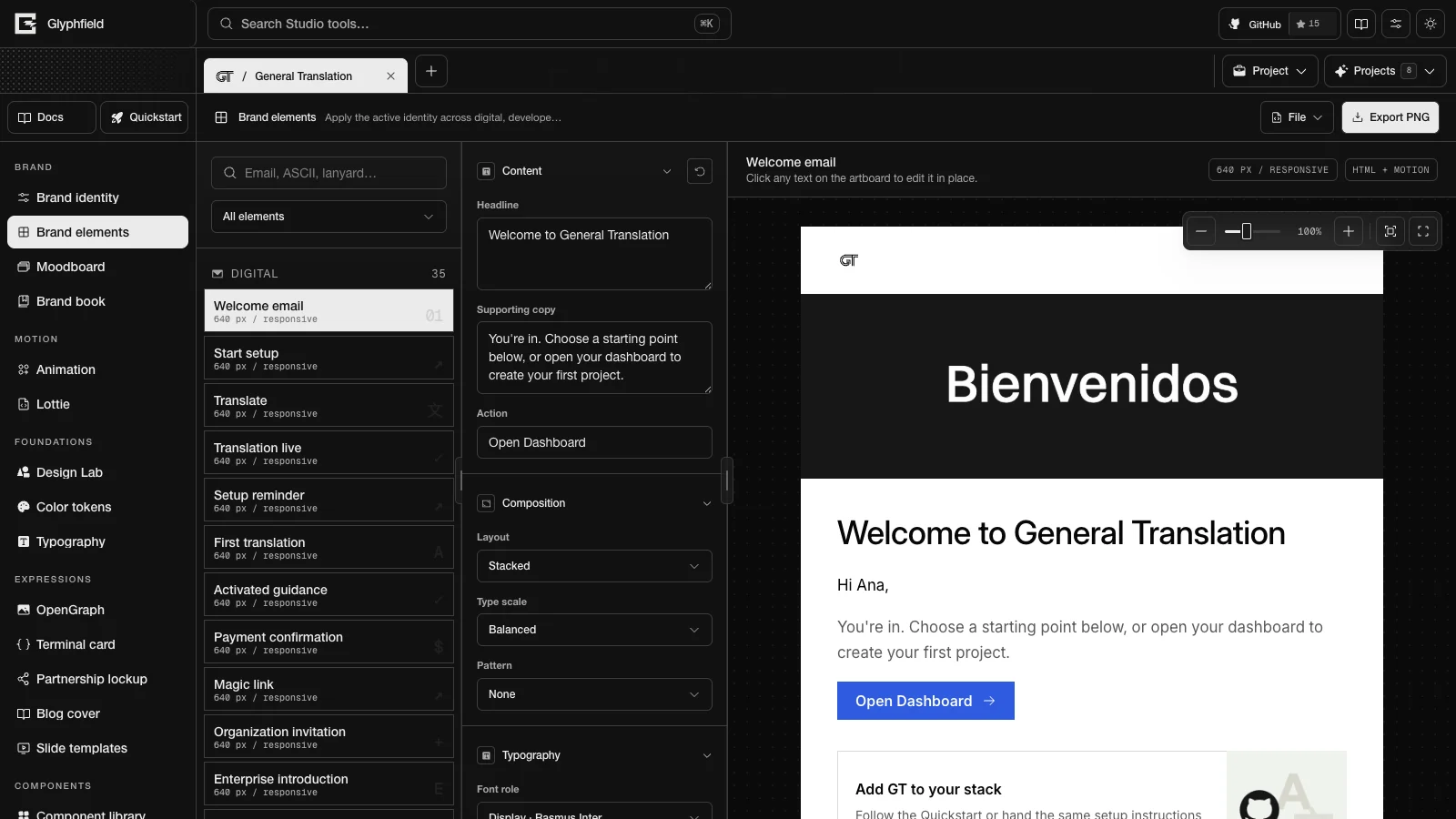
Layout
| Region | Contents |
|---|---|
| Tool header | File (Export PNG at 2×, Export HTML email, Download element brief and Advanced → Edit source code) and Export PNG |
| Left sidebar | A search field that matches name, category, description, size, format and keywords, the Brand element category select (All elements or one of seven categories), and the catalog grouped by category |
| Canvas | The element at its pixel size, the hint "Click any text on the artboard to edit it in place.", and chips with the catalog size and format. On narrow screens the Active brand element select replaces the sidebar. |
| Right sidebar | The Element editor |
Catalog
GET /api/elements returns the catalog with each element's id, name, category, dimensions, format, symbol, keywords and preview family. The catalog size (dimensions) is the intended production size. When it is a pixel size with the same proportions as the artboard and larger than it, the PNG export renders at the catalog size. The 3000 × 3000 podcast cover is one example. Component sizes such as the 420 × 560 pricing card and print sizes in millimeters or inches describe the subject, so those elements export at their artboard size. The tables list the PNG size at 1×.
Digital (35)
The 26 emails render 640 px wide at their content height and export as HTML. Their catalog size is "640 px / responsive". The three enterprise emails are plain-text emails.
| ID | |
|---|---|
| Welcome email | welcome-email |
| Start setup | onboarding-day3-no-api-key-email |
| Translate | onboarding-day3-api-key-email |
| Translation live | onboarding-day3-live-email |
| Setup reminder | onboarding-day5-no-api-key-email |
| First translation | onboarding-day6-api-key-email |
| Activated guidance | onboarding-day6-live-email |
| Payment confirmation | onboarding-payment-confirmation-email |
| Magic link | auth-magic-link-email |
| Organization invitation | membership-invitation-email |
| Enterprise introduction | enterprise-intro-email |
| Enterprise follow-up | enterprise-day3-follow-up-email |
| Enterprise final follow-up | enterprise-day7-follow-up-email |
| Credit balance warning | balance-soft-limit-email |
| Credit balance depleted | balance-hard-limit-email |
| Free credit warning | free-credit-soft-limit-email |
| Free credits exhausted | free-credit-hard-limit-email |
| Usage limit warning | usage-soft-limit-email |
| Usage limit reached | usage-hard-limit-email |
| Payment failed | billing-payment-failed-email |
| Plan canceled | billing-plan-canceled-email |
| Plan activated | upgrade-confirmation-email |
| Locadex setup complete | locadex-setup-complete-email |
| Locadex PR reminder | locadex-pr-reminder-email |
| Newsletter | newsletter-email |
| Event invitation | event-invitation-email |
| Element | ID | Catalog size | PNG at 1× |
|---|---|---|---|
| Email system sheet | email-system-sheet | Multi-template contact sheet | 1440 × content height |
| Email signature | email-signature | 480 × 160 | 640 × 220 |
| Web card | web-card | 720 × 480 | 720 × 480 |
| Logo on background | logo-background | 1600 × 1000 | 1600 × 1000 |
| OpenGraph image | opengraph | 1200 × 630 | 1200 × 630 |
| 404 page | error-page | Responsive | 1440 × 900 |
| Favicon set | favicon-set | 16–512 px | 1200 × 720 |
| App icon | app-icon | 1024 × 1024 | 1200 × 720 |
| App store gallery | app-store-gallery | 1290 × 2796 | 1600 × 1400 |
Product (20)
| Element | ID | Catalog size | PNG at 1× |
|---|---|---|---|
| Navigation bar | navigation-bar | Responsive | 1440 × 520 |
| Hero section | hero-section | 1440 × 760 | 1440 × 760 |
| Feature grid | feature-grid | 3–6 cards | 1440 × 800 |
| Pricing card | pricing-card | 420 × 560 | 1200 × 760 |
| Testimonial card | testimonial-card | 640 × 400 | 1100 × 720 |
| Form controls | form-controls | Responsive | 1280 × 800 |
| Command menu | command-menu | 640 × 480 | 1100 × 720 |
| Modal dialog | modal-dialog | 560 × 360 | 1280 × 800 |
| Toast notification | toast-notification | 420 × auto | 1000 × 600 |
| Data table | data-table | Responsive | 1280 × 800 |
| Dashboard widget | dashboard-widget | 480 × 320 | 1000 × 720 |
| Empty state | empty-state | Responsive | 1280 × 800 |
| Checkout card | checkout-card | 480 × 600 | 1000 × 800 |
| Settings panel | settings-panel | Responsive | 1280 × 800 |
| Authentication screen | auth-screen | Responsive | 1280 × 800 |
| Sidebar navigation | sidebar-navigation | 240 px / responsive | 1280 × 800 |
| Search surface | search-surface | 720 × 560 | 1280 × 800 |
| Onboarding checklist | onboarding-checklist | 640 × 560 | 1280 × 800 |
| File uploader | file-uploader | 640 × 360 | 1280 × 800 |
| Status page | status-page | Responsive | 1280 × 800 |
Developer (9)
| Element | ID | Catalog size | PNG at 1× |
|---|---|---|---|
| CLI brand | cli-banner | 80 columns | 960 × 620 |
| ASCII mark | ascii-mark | Monospace grid | 1280 × 640 |
| Terminal theme | terminal-theme | Responsive | 1280 × 640 |
| GitHub README hero | github-readme | 1280 × 640 | 1280 × 640 |
| Documentation header | docs-header | 1440 × 480 | 1440 × 480 |
| Package card | package-card | 512 × 320 | 512 × 320 |
| API reference hero | api-reference-hero | 1440 × 720 | 1440 × 720 |
| Code playground | code-playground | 960 × 640 | 960 × 640 |
| Release notes | release-notes | 1200 × 630 | 1200 × 630 |
Social (8)
| Element | ID | Catalog size | PNG at 1× |
|---|---|---|---|
| X / Twitter post | x-post | 1600 × 900 | 1600 × 900 |
| LinkedIn post | linkedin-post | 1200 × 1200 | 1200 × 1200 |
| Community card | community-card | 1200 × 675 | 1200 × 675 |
| Social avatar | social-avatar | 400 × 400 | 1200 × 720 |
| Product launch card | launch-card | 1600 × 900 | 1600 × 900 |
| Video thumbnail | video-thumbnail | 1280 × 720 | 1280 × 720 |
| Podcast cover | podcast-cover | 3000 × 3000 | 3000 × 3000 |
| Social carousel | social-carousel | 1080 × 1350 | 1080 × 1350 |
Editorial (7)
| Element | ID | Catalog size | PNG at 1× |
|---|---|---|---|
| Slide deck title | slide-title | 16:9 | 1600 × 900 |
| Slide section | slide-section | 16:9 | 1600 × 900 |
| Blog cover | blog-cover | 1200 × 630 | 1200 × 630 |
| Report cover | report-cover | A4 / US Letter | 1000 × 1414 |
| Press kit | press-kit | Multi-format | 1600 × 900 |
| Case study cover | case-study-cover | 1200 × 630 | 1200 × 630 |
| Whitepaper cover | whitepaper-cover | A4 / US Letter | 1000 × 1414 |
Event (5)
| Element | ID | Catalog size | PNG at 1× |
|---|---|---|---|
| Lanyard pass | lanyard | 90 × 140 mm | 1000 × 1400 |
| Event badge | event-badge | 105 × 148 mm | 1000 × 1400 |
| Event backdrop | event-backdrop | 16:9 / large format | 1600 × 900 |
| Partnership lockup | partnership-lockup | Flexible lockup | 1600 × 900 |
| Booth wall | booth-wall | 10 × 8 ft | 1500 × 1000 |
Physical (5)
| Element | ID | Catalog size | PNG at 1× |
|---|---|---|---|
| Business card | business-card | 3.5 × 2 in | 1400 × 900 |
| Sticker sheet | sticker-sheet | A5 sheet | 1500 × 1060 |
| Packaging label | packaging-label | 4 × 6 in | 1000 × 1500 |
| Letterhead | letterhead | A4 / US Letter | 1000 × 1414 |
| Notebook cover | notebook-cover | A5 | 1000 × 1414 |
Controls
Click a headline, supporting copy, action, name, role or partner name on the artboard to edit it in place. The accessible labels are Edit headline in place, Edit supporting copy in place and so on. In-place edits stay in sync with the inspector, the source and the brief.
The Element editor shows only the controls an element supports:
| Section | Controls |
|---|---|
| Content | Reset element, Headline, Supporting copy and Action. Person elements have Name and Role. The partnership lockup has Partner name. |
| Composition | Layout (Split, Stacked, Centered), Type scale (Compact, Balanced, Bold), Pattern (None, Dots, Grid, Dither) and Pattern opacity (0–100%) |
| Typography | Font role (any identity role) and Weight (100–550) for the display type |
| Shared asset | Library asset (an identity or proof asset, or No shared asset), Placement (Background, Header, Banner, Card) and Asset opacity (0–100%) |
| Artwork | Horizontal and Vertical offset (−120 to 120 px) and Scale (40–200%) |
| Color | Background, Text and Accent |
| Brand details | Show logo with the logo appearance controls (invert, dither, outline and shadow), and Show website |
Settings are stored per project and per element. Reset element removes the element's settings and returns it to the identity defaults.
Export
The export preview is the dialog that shows an export with its file name and a download button.
| Action | Result |
|---|---|
| Export PNG | Renders the element with every edit at its PNG size and opens it in the export preview |
| File → Export PNG at 2× | Renders at twice the PNG size and downloads it |
| File → Export HTML email | Downloads a send-ready HTML email. Enabled for email elements only. |
| File → Download element brief | Opens the JSON brief in the export preview |
PNG files embed the brand fonts and are named <identity>-<element>.png or <identity>-<element>@2x.png. HTML files are named <identity>-<element>.html.
The HTML email is a 600 px table layout with inlined styles, an Outlook (MSO) wrapper, a hidden preheader of up to 140 characters, a table-based button that renders in Outlook, and absolute image URLs. Its footer links to Unsubscribe at /account on the identity's website. The content differs by element:
| Content | |
|---|---|
| Lifecycle emails | A wordmark header, header art, a greeting with the sample person's first name, the body, an action button and the template's supporting cards. The Welcome email lists up to three products when its template has no cards. |
| Enterprise emails | Plain text with a greeting and a signature from the sample person. No header or art. |
| Newsletter | Up to three items from the identity's latest update and up to three products |
| Event invitation | The date, time and place of the sample event above the headline |
| Email signature | A standalone signature block instead of the 600 px layout |
| Email system sheet | No HTML export |
The wordmark header and header art appear while Show logo is on. General Translation's lifecycle emails use GT's animated GIF header art, linked by absolute URL. Every other email uses a 1200 × 380 PNG of the brand's graphic device, embedded as a data URL. Host that PNG and replace its src before you send through a client that blocks data URLs, such as Gmail.
Source format
File → Edit source code shows the selected element as glyphfield.brand-element version 2:
{
  "schema": "glyphfield.brand-element",
  "version": 2,
  "elementId": "welcome-email",
  "headline": "Welcome to Stripe",
  "body": "…",
  "cta": "Open workspace",
  "layout": "stacked",
  "accentColor": "#533AFD"
}
Applying source selects elementId when it is present. It stores only the values that differ from the identity defaults, so untouched copy keeps following identity edits. Omitted settings keep their current values, so { "elementId": "x-post" } only selects an element. Colors are six-digit HEX, and enum values must match the editor options. Numbers are clamped: artwork offsets to ±120, artwork scale to 40–200, opacities to 0–100 and font weight to 100–900 (displayed at most 550). Text is limited to 400 characters for the headline, 2000 for the body, 200 for the action and the role, and 120 for the name and the partner name. Unknown keys are ignored. A version 1 document has no elementId and applies to the selected element.
Browser API
The Browser API (window.glyphfield.studio) exposes these actions while Brand elements is the active tool. An export artifact is an object with a non-empty blob and a fileName.
| Action | Input | Output |
|---|---|---|
brand-element.export.png | { elementId?, scale?: 1 | 2, download? } | An export artifact. width and height are the PNG size. Selects elementId first. |
brand-element.export.html | { elementId?, assetOrigin?, download? } | An export artifact. previewText holds the HTML. assetOrigin sets the origin of image URLs (default: the Studio origin). It renders elementId without selecting it. |
brand-element.export.brief | None | An export artifact with the brief JSON |
The browser brief is { element, settings, identity: { colors, id, name, shortName, tagline, typography, voice, website }, schemaVersion: 2 }.
HTTP
GET /api/elements returns { categories, count, elements, generation, schemaVersion: 1 }. POST /api/generate with kind: "element-brief" and an elementId returns { element, generation: { previewFamily, source }, identity, schemaVersion: 1 }. The HTTP brief resolves the element against an identity but has no editor settings. See Generation API. A document from the source drawer is not an HTTP request body.
Limits
- PNG export at 1× or 2× of the PNG size, which is the catalog pixel size when it matches the artboard's proportions and the artboard size otherwise.
- HTML export for email elements only.
- Font weights display up to 550.
Brand identity
Edit the shared brand identity that every Studio tool reads, check its brand health score, set it up with a coding agent, and download a brand kit.
Moodboard
Compose the brand identity as an editable board of tiles in five compositions, edit each tile's layout and copy, and export it as PNG, SVG or JSON.