 Glyphfield
Partnership lockup
Lock up the brand with one or more partners using optical sizing, separators and alignment rules, then export the lockup as PNG or SVG.
Partnership lockup (tool ID partnership) makes co-brand lockups. It is one of the expression tools. The partner lockup is one layer that holds the logo of the active brand and any number of partners. A partner is a logo or a written name. Logos come from the identity's proof assets, the other built-in identities, the Northstar sample partner or an uploaded file. The template starts with the identity's own proof partner. When the identity has no proof asset to use, the template uses the written placeholder "Partner".
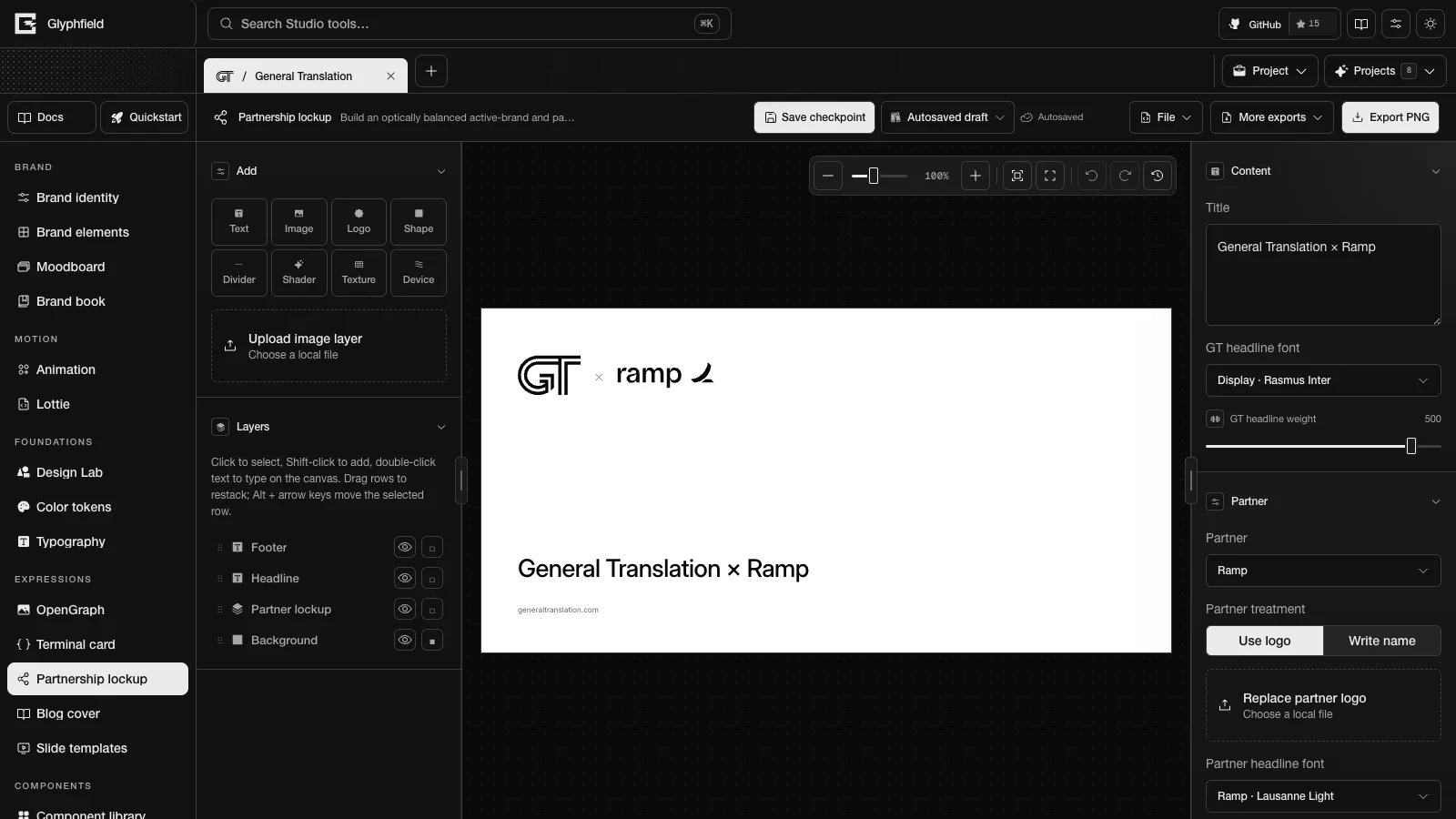
Optical sizing balances partners by the ink they show. Bundled logos carry a measured ink box, so empty space inside a logo file does not make that partner look smaller.
Content controls
| Section | Controls |
|---|---|
| Content | Title and two headline type controls named after the identity's short name, for example GT headline font and GT headline weight for General Translation |
| Partner | Partner, Partner treatment (Use logo or Write name), then Lockup name for a written partner or Replace partner logo for a logo. Partner headline font, Upload partner headline font and Partner headline weight style the partner's name in the headline and in a written lockup. Lockup spacing sets the gap on each side of a separator, 0–160 px |
| Lockup | One row per extra partner with its own artwork picker, upload and remove button. Add partner adds the next partner that is not in the lockup yet, and Add written partner adds a written name. The alignment rules follow |
When the headline still reads "Brand × Partner" with the current names, choosing another partner updates the headline to match.
Alignment rules
| Control | Options |
|---|---|
| Separator | ×, +, /, Rule (a thin vertical line, |) or None |
| Sizing | Optical balance (the default) gives every mark the same visual area, so a square mark and a long wordmark carry equal weight. Equal height and Equal width are also available |
| Alignment | Start, Center or End places the lockup in its box |
| Vertical | Center, Top or Baseline aligns the marks. Baseline aligns their bottoms (bottom in the API) |
| Logo color | One color (mono, the default) recolors the marks to the text color. Original colors (original) keeps their artwork colors |
The lockup scales down to fit its box.
Layouts and formats
| Layout | ID | Arrangement |
|---|---|---|
| Lockup | lockup | The lockup at the top, the headline above the footer |
| Centered | centered | The lockup in the middle with the headline below it |
| Hero lockup | hero | A large lockup alone, with the website in the footer |
| Announcement | announcement | A large headline above a rule, with the lockup at the bottom |
The default format is lockup (1200 × 600). The other social formats listed in Expression tools also apply.
Export
Export PNG renders the lockup at 2×. More exports → Export SVG downloads a self-contained SVG with the partner logos and fonts embedded.
Browser actions
| Action | Use |
|---|---|
partnership.export.png / partnership.export.svg | Export |
partnership.partner.add / partnership.partner.remove | Partners |
partnership.lockup.update | Separator, sizing, alignment, gap and tone |
partnership.document.describe | Format, layouts, pages and layers |
partnership.layer.add / partnership.layer.update / partnership.layer.remove / partnership.layer.duplicate | Layer edits |
partnership.layer.reorder / partnership.layer.select / partnership.layer.align | Stack order, selection and alignment |
partnership.format.set / partnership.layout.apply / partnership.template.reset | Format, layout and template |
partnership.history.undo / partnership.history.redo | History |
The partner actions edit the lockup on the active page.
partnership.partner.addtakes{ partnerId?, kind?: 'logo' | 'text', label? }and returns{ id }. WithoutpartnerId, it adds the next partner that is not in the lockup yet. A text partner useslabel, or "Partner" whenlabelis missing.partnership.partner.removetakes{ id }. It does not remove the brand (brand) or the last entry.partnership.lockup.updatetakes{ separator?: '×' | '+' | '/' | '|' | 'none', sizing?: 'optical' | 'height' | 'width', justify?: 'start' | 'center' | 'end', verticalAlign?: 'center' | 'top' | 'bottom', gap?, tone?: 'original' | 'mono' }.gapaccepts 0–400. Values outside these lists are rejected.
See Expression tools for the shared actions.
HTTP
POST /api/generate with { kind: 'template', template: 'partnership', partnerId?, partnerLogoDataUrl? } renders the lockup as an SVG. partnerId is a proof asset ID of the identity, another built-in identity ID or template-northstar. See Generation API.