 Glyphfield
Brand setup with an agent
Let Claude Code, Codex or Cursor research a brand from its own sources, fill the complete identity, pass the health audit and export the brand kit.
The Brand identity tool holds the shared identity (voice, strategy, colors, type, logos and imagery) that every Glyphfield tool reads. A coding agent such as Claude Code, Codex or Cursor can set it up from start to finish. The agent researches the brand from the user's website, repository or design files and fills every section through the Studio Browser API (window.glyphfield.studio). It then adds the real logo and font files, runs the brand health audit, fixes the findings and exports the brand kit.
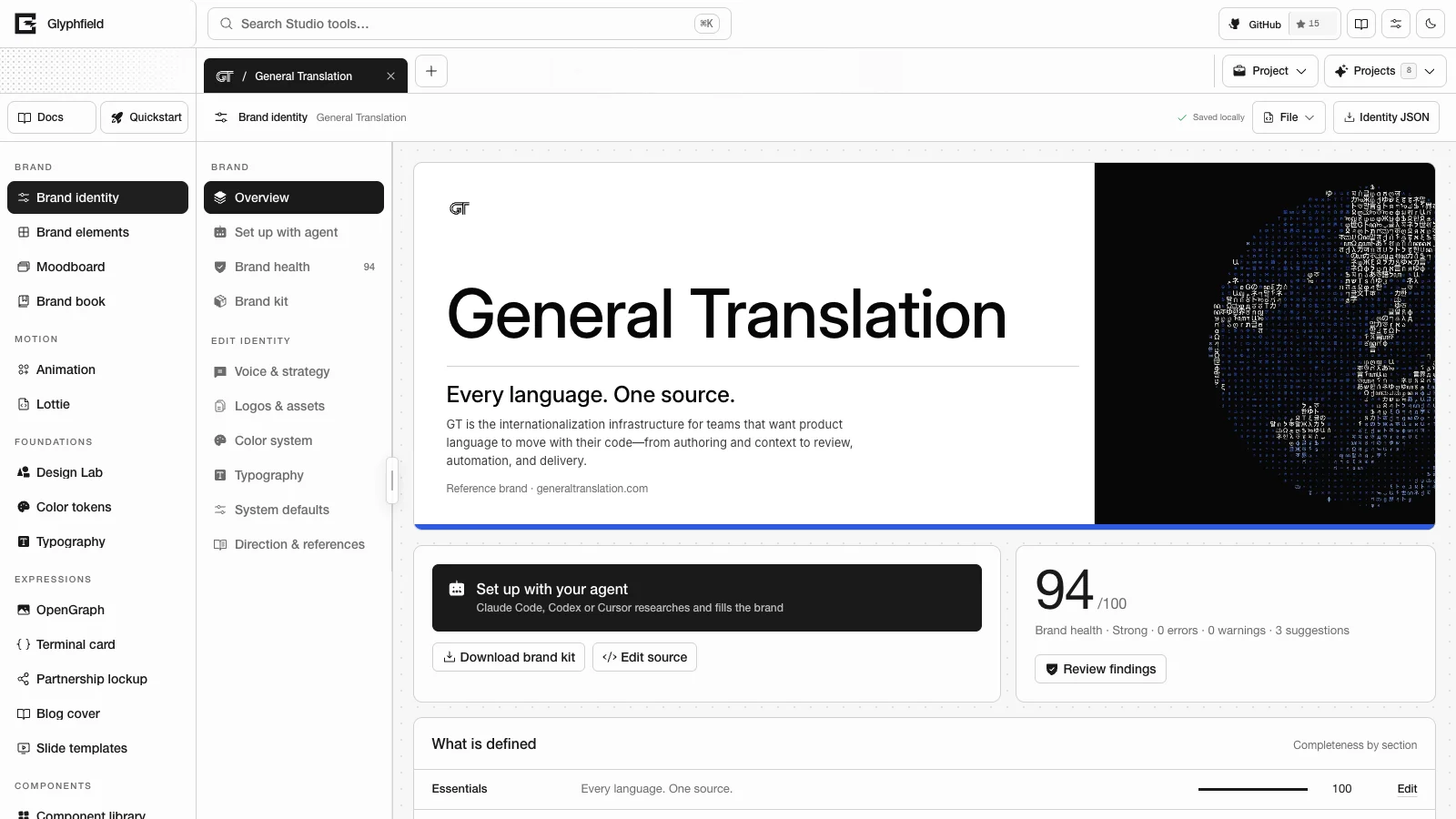
Start from the Studio
Open the Brand identity tool and choose Set up with agent in its section list. The panel shows a ready-to-run prompt for the active project with the project URL, the rules and every call. Choose New brand for a fresh project or Improve this brand for one that already has content. Then choose Copy prompt and paste the prompt into the agent. identity.setup.prompt { mode } returns the same text, with mode set to 'new' or 'improve'.
For a new brand, create the project first. Add brand project → Set up with your agent creates an empty identity and opens this panel. Blank brand creates the same empty identity on its overview, and Copy a reference brand → Starter creates a complete neutral example to replace. An agent can do the same with identity.project.create { from, name }. from: 'starter' (the default) copies the Starter template, from: 'scratch' starts empty, a built-in identity ID copies that identity, and a project ID duplicates that project with its workspaces. The action opens the new project and returns { id, name, kind, from, url }. Read window.glyphfield.studio again before the next call, because the new project's workspace now owns the API.
Workflow
- Research the brand. Read the homepage, about page, README and docs. Read CSS custom properties, the Tailwind config or token files, the font files and their licenses, the logo files and any brand guide. Use only sources the user authorized, and record each one in
sourceNotes. Do not invent customers, metrics, claims or slogans. - Draft a merge patch. Include the essentials, strategy, voice with
voice.examples, and semantic colors withproportionandcolorPairings. Add acolorSystemthat maps the light and dark semantic roles to color refs, typography roles with a monospace Code face and size-tunedletterSpacing, and atypeScalewithroleSteps. Add the graphic device, image direction, products with one-lineproductDetails, proof statements,customerskept apart from proof, templatesamplesand applications. The tagline, promise and phrases must be different lines. - Connect. Open
/studio?tool=identity&project=<id>in a browser the agent controls, wait forwindow.glyphfield.studio, calldescribe(), and confirm thatactiveTool()returnsidentity. - Validate.
identity.validate { identity: patch }returns{ ok, issues }and changes nothing. Inpatchmode (the default), it merges the patch into the active identity the same wayidentity.applydoes. It therefore also reports duplicate IDs, unknown color IDs and unknownfontIdvalues. A clean result means thatidentity.applyaccepts the same patch when noreplaceorremoveoption is passed. - Apply.
identity.apply { identity: patch }merges the patch and returns{ identity, warnings, saved, health }. A failure throws oneTypeErrorthat lists every issue. - Add files. Call
identity.asset.add { file, slot }for each logo andidentity.font.add { file, roles, license, sourceUrl }for each font. Fonts can be TTF, OTF, WOFF or WOFF2 files of up to 2.5 MB. - Audit and fix. Run
identity.audit, then callidentity.fix { fixId }or follow each finding'sagentPromptuntil no errors remain.prune-fontsremoves template fonts that no typography role uses,separate-customersmoves customer names out ofproof, anddistinct-phrasesdrops phrases that repeat the tagline or promise. - Save and export. Call
identity.save, thenidentity.export.kit { format: 'zip' }, and check the returned Blob.
const studio = window.glyphfield.studio;
if (studio.activeTool() !== 'identity') throw new Error('Open the Brand identity tool first.');

const patch = {
  tagline: 'Fast, careful tools for small teams.',
  colors: [
    { id: 'paper', name: 'Paper', hex: '#FAFAF7', role: 'Primary background', proportion: 60 },
    { id: 'ink', name: 'Night', hex: '#0B0B0C', role: 'Text and marks', proportion: 28 },
    { id: 'emphasis', name: 'Signal lime', hex: '#C6FF3D', role: 'Primary action', proportion: 8 },
  ],
  colorPairings: [{ foreground: 'ink', background: 'paper', usage: 'Body text', level: 'AA' }],
};

const check = await studio.invoke('identity.validate', { identity: patch });
if (!check.ok) throw new Error(check.issues.map(({ message }) => message).join('\n'));
await studio.invoke('identity.apply', { identity: patch });

// svgBytes holds the bytes of a logo file the user authorized.
const logo = new File([svgBytes], 'mark.svg', { type: 'image/svg+xml' });
await studio.invoke('identity.asset.add', { file: logo, slot: 'mark-dark' });

const report = await studio.invoke('identity.audit');
for (const finding of report.findings) {
  if (finding.fix) await studio.invoke('identity.fix', { fixId: finding.fix.id });
}
await studio.invoke('identity.save');

const kit = await studio.invoke('identity.export.kit', { format: 'zip' });
if (kit.blob.type !== 'application/zip' || !kit.blob.size) throw new Error('The brand kit is empty.');
Color and type systems
colorSystem.lightandcolorSystem.darkmap the twelve semantic roles (background,surface,surface-muted,foreground,foreground-muted,border,primary,primary-foreground,focus,positive,caution,negative) to color refs such asink, or to a scale step such asink.700(steps 50–950). An omitted role is derived from the palette. Text roles should reach 4.5:1 contrast, and line and status roles 3:1, in both modes. The health score does not check semantic roles. The exportedbrand.mdlists failing roles under “Fix before use”. SetcolorSystem.scalesto tune a color's OKLCH tint ramp only when the brand publishes one.typeScale { basePx, ratio, roleSteps }sets each size asbasePx × ratio^step.basePxis 10–24 andratiois 1.067–1.8. Use at least 1.25 for display work, and expect the audit to flag ratios below 1.2.roleStepsnames the step each role uses:caption,small,body,lead,h4,h3,h2,h1ordisplay. The defaults aredisplayfor Display,bodyfor Body,leadfor Accent andsmallfor Code.- Set tracking by size. Display
letterSpacingis slightly negative, about -0.01 to -0.025 of its pixel size. Body and Code use 0. Do not add positive tracking to lowercase text. Kerning stays on and optical sizing stays automatic. SetopticalSizeorslantonly when the brand fixes them. - The exported
brand.mdrepeats these rules for coding agents, together with the layout rule that no eyebrow label sits above a headline.
What templates read
Brand elements, moodboards, the brand book and the identity preview fill every layout from the identity. They read products with their productDetails one-liners, proof statements, customers, the tagline, promise and phrases, and samples. Samples cover a person and an event, the install command, a code sample, product actions, a dashboard metric, published plans and the latest update. A brand that lacks one of these fields gets neutral copy built from the fields it has. Glyphfield does not fill the gap with its own product copy.
Export a template to check the result. brand-element.export.png { elementId: 'opengraph' } returns a 1200 × 630 PNG, and brand-element.export.html { elementId: 'welcome-email' } returns a send-ready HTML email.
Source contract
GET /api/brand/validate returns the BrandIdentity JSON Schema (schema), the merge-patch schema (patchSchema), the merge rules and the logo slots. /openapi.json publishes the same schema as BrandIdentity.
Merge rules
- Objects (
strategy,voice,graphicSystem,dossier,artDirection,style,typeScale,colorSystem,samples) merge by key.colorSystem.scalesmerges byid. - Record arrays merge by
id. A matching ID updates that record, a new ID appends one, and records you leave out are kept.typographymerges byrole, andcolorPairingsmerges by foreground and background. - String lists,
voice.examples,productDetailsandsamples.plansare replaced as a whole. replacenames record collections to replace as a whole:applications,assets,colors,fonts,motion,proofAssets,references,colorPairingsortypography.replace: ['colors', 'colorPairings']keeps a template's records from staying in a new brand.removedeletes records by ID fromapplications,assets,colors,fonts,motion,proofAssetsorreferences, for exampleremove: { assets: ['id'], colors: ['id'] }.id,builtIn,kind,revisionandpresetFingerprintbelong to the project and keep their values.- Asset, font and motion paths must be
data:URLs or root-relative paths on the Glyphfield origin. Remote URLs are rejected, and Glyphfield does not fetch them. - Unknown fields are kept and reported as warnings.
Each error message names the exact path and the expected value, for example colors[1].hex must be a six-digit HEX color such as "#1A2B3C"; received "#FFF". and typography[1].fontId "acme-sans" does not match any fonts[].id (…). Add the file with identity.font.add or pick an existing font.
Glyphfield tools read the color IDs ink (text), paper (background), muted (quiet surface) and emphasis (accent). success, warning, progress and error are optional extensions.
Logo slots
| Slot | Use |
|---|---|
mark-dark | Dark mark for light surfaces. Required |
mark-light | Light mark for dark surfaces. Required |
wordmark | Wordmark or lockup for light surfaces |
wordmark-light | Wordmark or lockup for dark surfaces |
mark-mono | One-color mark for embossing, favicons and single-ink print |
Brand health
identity.audit scores completeness from 0 to 100 across eleven weighted sections and returns { schemaVersion, score, grade, counts, sections, contrast, findings }. Findings cover missing logo variants, text pairs below WCAG AA (4.5:1) or AA-large (3:1), palette proportions, unlicensed or missing font files, missing voice examples, type scale and leading, alt text, naming and identity storage size. Each finding has an agentPrompt. Findings with a deterministic fix also have a fix.id for identity.fix. One such fix adjusts a color's lightness until its pair passes and keeps its hue. Brand identity lists the section weights, grades and fix IDs.
Without a browser
POST /api/brand/validate validates and normalizes a complete identity or a patch, and returns the health report for a complete identity. Its mode defaults to full. The route has no stored identity to merge into. In patch mode it therefore checks the patch alone and skips cross-references such as unknown color IDs and fontId values. POST /api/brand/kit renders dtcg, css, tailwind or markdown from a complete identity. Both routes store nothing and reject unknown top-level fields. See the Endpoint reference.
Built-in identities
A built-in identity can be edited in place. When Glyphfield ships a newer version of a built-in, it keeps every edit, and Restore the shipped version on the overview returns to the shipped one. To make your own brand from a built-in, create a copy first with Add brand project → Copy a reference brand.
Identities and custom assets
Choose a built-in brand identity for a generation request, override its name, colors and logo, and embed local images as base64 data URLs.
Browser-agent workflow
Operate the Glyphfield Studio from a browser-driving agent when the output depends on WebGL, Canvas, local files, visual placement, Lottie, GIF or MP4.